Scrolling LED XControl
 Example_Scrubber_Samah
03-23-2017
04:17 PM
Example_Scrubber_Samah
03-23-2017
04:17 PM
- Subscribe to RSS Feed
- Mark as New
- Mark as Read
- Bookmark
- Subscribe
- Printer Friendly Page
- Report to a Moderator
Products and Environment
This section reflects the products and operating system used to create the example.To download NI software, including the products shown below, visit ni.com/downloads.
- LabVIEW
Software
Code and Documents
Attachment
Overview
This example shows a Scrolling LED sign implemented by an XControl of String data type and it demonstrates several key ways to use an XControls.
Description
This XControl works around several limitations of XControls. In this example:
- The XControl appears to update continuously. If the Facade VI is called continuously, it will cause the front panel to hang. However, this example appears to update continuously as it uses a background task VI that is started/stopped dynamically.
- The XControl drops as an indicator by default. This involves a small trick in the Init.vi that is a bit non-intuitive.
- The XControl has a custom popup menu. View that Facade VI to see this functionality.
The XControl can display all printable ASCII characters from 0 to 127. Any non-printable characters in this range and any characters outside this range are displayed as spaces.
Requirements
LabVIEW 2012 (or compatible)
Steps to Implement or Execute Code
- Download and Extract "XControl Scrolling LED_LV2012_NI Verified" folder
- Open "LED Scroll Main.vi" from the project
- The first LED XControl will display the default string assigned to it. The second will display the string wired to it. Navigate to the block
Diagram to change the value of the string - Run the VI
- Right click any of the XContols and click on Set Text from the drop-down menu to change the text being displayed.
- Right click any of the XControls and click on Show Diagram to check the code associated to the XControl
- You can grow and shrink the XControl. If you grow it in the horizontal, it will add rows to the array, but not if you grow it vertically.
- Stop the VI
- Run again and notice that the value of the default control was the same from previous run.
- To view the primary functionality of the code open "LED XControl Scroll.vi" from LED Display.xctl sub-files
Additional Information or References
Front Panel


Block Diagram
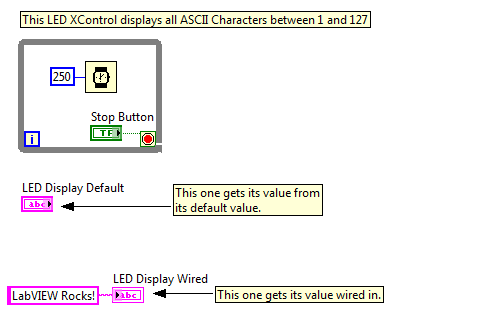
For more details about the execution navigate to the VIs inside LED Display.xctl
**This document has been updated to meet the current required format for the NI Code Exchange.**
Example code from the Example Code Exchange in the NI Community is licensed with the MIT license.


- Mark as Read
- Mark as New
- Bookmark
- Permalink
- Report to a Moderator
Generating Exe
What is to consider that this XControl also works in an exe-Version?
- Mark as Read
- Mark as New
- Bookmark
- Permalink
- Report to a Moderator
Generating EXE bug has been CAR'd
I did not know when I posted this example that it does not work when made into a Built Application. That has now been filed as a bug. (CAR 4EI8KCJ1). The bug exists in both 8.2 and 8.5.
- Mark as Read
- Mark as New
- Bookmark
- Permalink
- Report to a Moderator
No bug in building EXE -- you just need the right build spec
When you build an EXE, the front panels of VIs are not included in the EXE by default. If you want the panel to be include, you have to tell the build specification to include it explicitly. In the case of this XControl, the front panel of "LED-ctrl ref scroll.vi" needs to be included so that the control references to its front panel work. If you made a build spec that explicitly said to include that VI's front panel, everything worked fine.
That's an annoying thing to have to remember, so I've put a new version of the XControl up. In this new version, the "LED-ctrl ref scroll.vi" has been edited to turn off the scrollbars. That's right -- no scrollbars. When you make any customization to the front panel of a VI, then AppBuilder defaults to "include front panel" since if you took the time to customize it, you probably want to display it. In this case, we don't want to display it, but the effect is the same. Now when you build this XControl into an EXE, it works as expected.
Thanks for the feedback!
- Mark as Read
- Mark as New
- Bookmark
- Permalink
- Report to a Moderator
Answer regarding LEDXControl in Built App
I posted a reply, but did not reply to you directly, so you may not have gotten notification. Please read the posts I made below and let me know if that helps you.


- Mark as Read
- Mark as New
- Bookmark
- Permalink
- Report to a Moderator
Kind of late, but why are the VIs underneath this XControl still running after I stop the Read Me.vi? I am asking because I opened the "LED-New Text,vi" just to discover that this was a modal window and had to kill LabVIEW 2011 to escape. Luckily I recovered the VIs I was working on.
- Mark as Read
- Mark as New
- Bookmark
- Permalink
- Report to a Moderator
Another question: when I drop the XControl on a panel and resize it horizontally, it actually does resize, as expected.
However, if I try to resize it vertically, I would expect it to prevent me from doing so, but it actually appears to change the size of the bounding box (if I try to expand it). Interestingly, if I pull down the lower bound, it will expand it downwards, whereas if I pull up the upper bound, it will MOVE UP the control and leave the lower bound where it originally was, thus expanding the bounding box. Finally, if I click with the cursor outside of the XControl and hover back over it, the cursor switched to the "finger pointing hand" BUT it will act as a selection tool.
The reason I am asking these questions (all this being tested in LV 2011) is because I wonder whether these are expected glitches of XControl (just getting started and not sure I will push my foray very far) or just imperfections of the example itself?

- Mark as Read
- Mark as New
- Bookmark
- Permalink
- Report to a Moderator
X: In both cases, I suspect these are just untested cases that need a bit of tender loving care to clean up. I'd have to investigate the code again to be sure of that.
- Mark as Read
- Mark as New
- Bookmark
- Permalink
- Report to a Moderator
No pb. I was just investigating myself, in particular the ability to modify the location of different XControl components (when the XControl is comprised of different objects).
My understanding at this stage is that the only freedom one has, is to resize the "Bounding Box" of the XControl and specifiy how the different controls within move or get resized...
I find that a tad limiting. For instance, a Graph with all its accessories (palette, legend, etc) becomes a monolithic object, with no freedom for the user to move the accessories around. Did I get that right?
- Mark as Read
- Mark as New
- Bookmark
- Permalink
- Report to a Moderator
Yes and no.
The bounding box is, indeed, the only built-in control you have for sizing, but you can write code to give yourself more options than that. LV built-in controls have grab handles (the little squares that you click on to change size). Using mouse over events, you can add your own grab handles for interior parts. This allows you to divide up the space between two interior parts or change the size of a single part. You could allow the user to grow your parts larger than the current bounding box, and then resize the bounding box as needed to accomodate the expanded control.
I think a better solution for what you're wanting is to have two separate XControls that know about each other -- i.e., when you drop one, it automatically scripts the other one onto the caller VI, and they maintain relative position with each other. You would have two FPTerms on the block diagram, but other than that, it would give you the parts independence you're looking for.
- Mark as Read
- Mark as New
- Bookmark
- Permalink
- Report to a Moderator
I guess I was hoping for an easier way to do this...
How would I for instance determine that the user is hovering over the Graph caption border rather than on the plot's name or style? And drawing resizing handles? Or move the different parts as the user moves the mouse around? That sounds like a fun project, but I'd rather be spared this work!
- Mark as Read
- Mark as New
- Bookmark
- Permalink
- Report to a Moderator
> but I'd rather be spared this work!
Unfortunately, when you get to that level of specialization, you're beyond the built-in supported features and you'll be rolling your own. Curiously, LV R&D devs had a similar complaint to yours not too long ago on the Microsoft WPF forums, and the reply I'm giving you is basically the same reply we got from them, so I definitely know your pain.
"It's not a bug -- it's just as far as the feature goes."
- Mark as Read
- Mark as New
- Bookmark
- Permalink
- Report to a Moderator
Fair enough. But surely you have to admit that trying to make an XControl behave just as a fully functional Graph (no additional functionality) should not require ANY work?
- Mark as Read
- Mark as New
- Bookmark
- Permalink
- Report to a Moderator
No, I don't have to agree with that. I agree that it would be nice if it didn't require any work. I am not the developer of the feature, but the goal of the XControl as I understood it was to put power into customers hands to do way more with controls than they could before. Whether any particular effect is achievable within that power or how easy that effect is open to debate. Discussing "should" would require way more knowledge than I have about how common this need is for users, how much impact it would have on the ease of use of the XControl for other purposes, etc. Those are topics I'm not privvy to.
- Mark as Read
- Mark as New
- Bookmark
- Permalink
- Report to a Moderator
I did not write "agree", I just said "admit". Anyhow, this was a rethorical question...
BTW, I am not the only one to feel the pain.


