Running a C DLL in LabVIEW
 Example_Scrubber_Ofir
10-22-2017
05:02 PM
Example_Scrubber_Ofir
10-22-2017
05:02 PM
- Subscribe to RSS Feed
- Mark as New
- Mark as Read
- Bookmark
- Subscribe
- Printer Friendly Page
- Report to a Moderator
Products and Environment
This section reflects the products and operating system used to create the example.To download NI software, including the products shown below, visit ni.com/downloads.
- LabVIEW
Software
Code and Documents
Attachment
Overview
This VI uses DLL files developed in C to sort a numerical array
Description
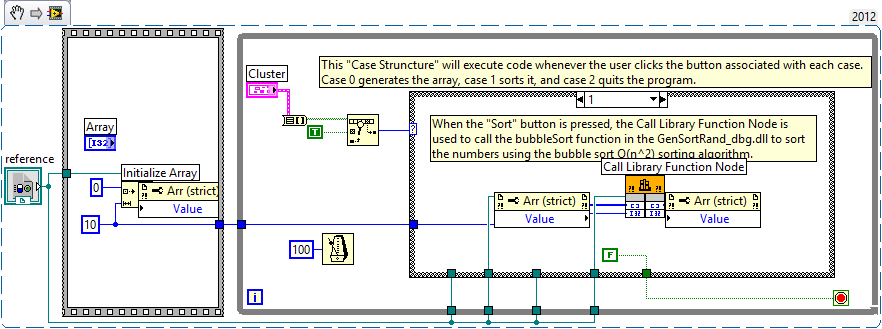
This example demonstrates that LabVIEW users can use code developed in an external development environment, including C++. The LabVIEW program below generates and sorts a numerical array by calling a C-built DLL via LabVIEW's Call Library Function Node. This example also contains the C source code that the DLL was built from. It contains a .c file and a .prj file that can be built in LabWindows/CVI, as well as a .cpp file and all of the project files necessary to build this in Microsoft Visual C++. If you see a broken arrow when you open the LabVIEW VI, double-click on the Call Library Function Node and relink to the exact path of the DLL.
Any C compiler can you be used to view and execute the C code. If you do not have a C compiler, you can download the LabWindows/CVI Evaluation Software to run the C code and to try the premium C environment for measurement and automation applications. At a minimum, the LabWindows/CVI Run Time Engine is required to run the CVI executable.
Requirements
LabVIEW 2012 or compatible
Any C compiler
Steps to Implement or Execute Code
- Run the VI
- Select "Generate", then "Sort" to observe the resulted array
- Press “Quit” to stop the VI
Additional Information or References
VI Block Diagram
**This document has been updated to meet the current required format for the NI Code Exchange. **
National Instruments
Product Support Engineer
Example code from the Example Code Exchange in the NI Community is licensed with the MIT license.


- Mark as Read
- Mark as New
- Bookmark
- Permalink
- Report to a Moderator
Excellent, Justin. I have a question regarding the performance of the Call Library Node - do you know if you incur any kind of penalty on performance for calling this node? That is, would a VI that runs at the same rate as the C code run at the same rate when called using the Call Library Node or might it run slower? Should we expect the C code called with this node to run at the same rate as it would if called using standard IO? (This question is related to a post I put up recently)
Also, not to steal NI's thunder  , but I believe that Netbeans has a free IDE in which one might view and develop C++ and it seems that Microsoft has recently made their Visual C++ Express Edition available as well.


