Start Trigger and Stop After n Pulses for Continuous Analog Input Using LabVIEW with DAQmx
 Example_Scrubber_Nian
07-22-2017
06:39 AM
Example_Scrubber_Nian
07-22-2017
06:39 AM
- Subscribe to RSS Feed
- Mark as New
- Mark as Read
- Bookmark
- Subscribe
- Printer Friendly Page
- Report to a Moderator
Products and Environment
This section reflects the products and operating system used to create the example.To download NI software, including the products shown below, visit ni.com/downloads.
- LabVIEW
Software
Code and Documents
Attachment
Overview
This VI demonstrates how to acquire a continuous amount of data (Waveform) using an internal clock and a digital start and reference trigger.
Description
The reference trigger that starts a continuous analog input acquisition is generated using a counter output after a desired number of digital pulses are counted. Make sure your signal input terminal matches the Physical Channel I/O Control. Also, make sure your digital trigger terminal matches the Trigger Source and Counter Controls. For further connection information, refer to the device documentation.
Requirements
- LabVIEW 2012 (or compatible)
Steps to Implement or Execute Code
- Select the physical channel to correspond to where your signal is input on the DAQ device.
- Enter the minimum and maximum voltage ranges. Note: For better accuracy, match the Input Ranges to the expected voltage level of the measured signal.
- Select the number of Samples per Channel to acquire.
- Set the Rate of the acquisition. Note: The Rate should be AT LEAST twice as fast as the maximum frequency component of the signal being acquired.
- Set the Trigger Source and the polarity of the Start Trigger Edge.
- Set the terminal to be used as the Reference Trigger Source and the number of pulses to be counted before stopping the acquisition.
- Configure the counter to be used. Note: The Reference Trigger Source should be set as the Counter Output Terminal of the Counter configured in this step.
Additional Information or References
VI Snippet

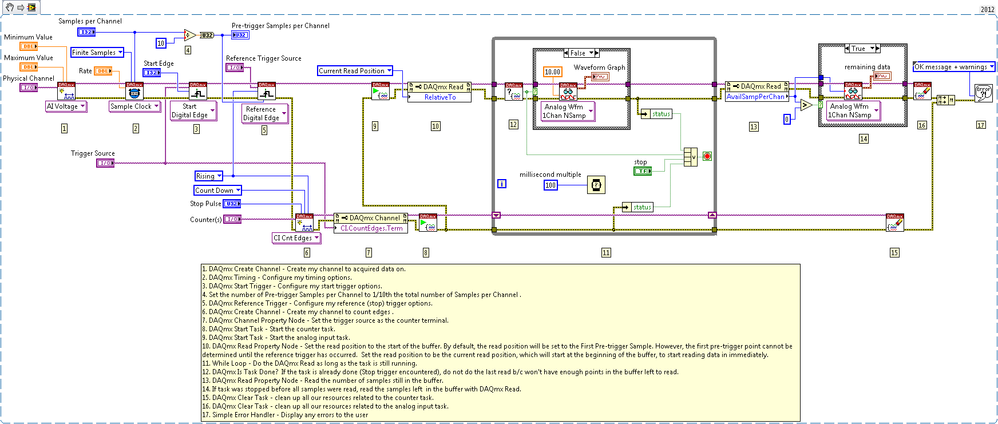
**This document has been updated to meet the current required format for the NI Code Exchange.**
National Instruments
Example code from the Example Code Exchange in the NI Community is licensed with the MIT license.


- Mark as Read
- Mark as New
- Bookmark
- Permalink
- Report to a Moderator
Could you please add a sceenshot of your block diagram and or front panel.
Thanks

- Mark as Read
- Mark as New
- Bookmark
- Permalink
- Report to a Moderator
I would also like to see that block diagram. It would be better so that I don't have to download to see what's going on.
Field Engineer
- Mark as Read
- Mark as New
- Bookmark
- Permalink
- Report to a Moderator
Thanks!
Field Engineer


- Mark as Read
- Mark as New
- Bookmark
- Permalink
- Report to a Moderator
xiexie~


