From Friday, April 19th (11:00 PM CDT) through Saturday, April 20th (2:00 PM CDT), 2024, ni.com will undergo system upgrades that may result in temporary service interruption.
We appreciate your patience as we improve our online experience.
From Friday, April 19th (11:00 PM CDT) through Saturday, April 20th (2:00 PM CDT), 2024, ni.com will undergo system upgrades that may result in temporary service interruption.
We appreciate your patience as we improve our online experience.
 Example_Scrubber_Samah
01-30-2017
08:19 AM
Example_Scrubber_Samah
01-30-2017
08:19 AM
To download NI software, including the products shown below, visit ni.com/downloads.
Overview
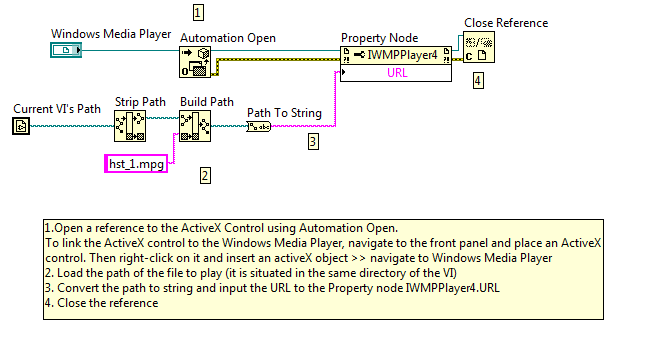
This example VI opens Windows Media Player on your computer and plays a selected file.
Description
You can use any video file that is supported by Windows Media Player (.mpa, .mp2, .mp3, .avi, .wma, etc..). The Strip Path VI finds the location of the current VI. This is particularly useful if the example file is saved to this folder as well. If not, then the video file path can be referenced directly into the constant. The Build Path VI adds the current folder filepath to the video name so that the full filepath can be used to play the video. There are many Windows Media Player (WMP) ActiveX classes that can manipulate it in a number of ways.
Requirements
Steps to Implement or Execute Code
Additional Information or References
VI Block Diagram
**This document has been updated to meet the current required format for the NI Code Exchange.**
Example code from the Example Code Exchange in the NI Community is licensed with the MIT license.
Not all of us have moved on to 8.6

Good example! I tried it on LV2009 and it works, however the stretchToFit method does not work so it does not resize the player when the main window is resized.
- WinXP, WMP 10.0
It can meet basic needs,so good.
How can you build this from scratch? I placed "Automation Open" and "property node", but I was not able to place the reference to "WindowsMediaPlayer". I tried using "create control", but I was not able to generate similar controls. Downloading it from your site, I was able to run it very well, I'm working with LabVIEW13.
Thank you.
Thank you so much!