Using a DAQmx Task Created in MAX in LabVIEW
 Dan_K
Dan_K
 Dan_K
01-30-2017
07:57 AM
Dan_K
01-30-2017
07:57 AM
- Subscribe to RSS Feed
- Mark as New
- Mark as Read
- Bookmark
- Subscribe
- Printer Friendly Page
- Report to a Moderator
Products and Environment
This section reflects the products and operating system used to create the example.To download NI software, including the products shown below, visit ni.com/downloads.
- Data Acquisition (DAQ)
Hardware
- LabVIEW
Software
- NI DAQmx
Driver
Code and Documents
Attachment
Overview
This VI is a very simple bit of example code that uses a task created in Measurement & Automation Explorer (MAX) and acquires data.
Description
Tasks in MAX can be used in LabVIEW very simply. You can either drag a task from MAX straight into your block diagram or you can place a Task Constant from the functions palette. The Task Constant can be found under Measurement I/O»NI-DAQmx. From here all you need to do for an acquisition task is connect the task to a DAQmx Start VI and then to a DAQmx Read VI followed by a DAQmx Stop VI.
Performing a continuous read would require the use of a while loop with a stop condition around the DAQmx Read VI.
There are benefits of using a task from MAX instead of using a DAQ Assistant
- You can control when the task starts and stops.
- You can easily use the same channel setup in multiple instances/VIs
- You can edit some aspects of the task for a particular instance/VI without changing the setup of the task.
- There are also benefits of using a task from MAX instead of setting up your task completely in LabVIEW
- You can set up multiple channels, scales, timing and triggers outside of LabVIEW, cleaning up your code.
- It is easier to port task information between different VIs.
Requirements to Run
Software
- LabVIEW 8.2 or compatible
- NI-DAQmx 8.3 or compatible
Hardware
- Most compatible NI DAQ devices, or simulated devices.
Steps to Implement or Execute Code
To create a Task in MAX:
- Under My System, right click on Data Neighborhood and select “Create new…”
- Select “NI DAQmx Task” and press “Next”
- Select the measurement type for the task
- Select the physical channel(s) to add to the task
- Name your task and select Finish
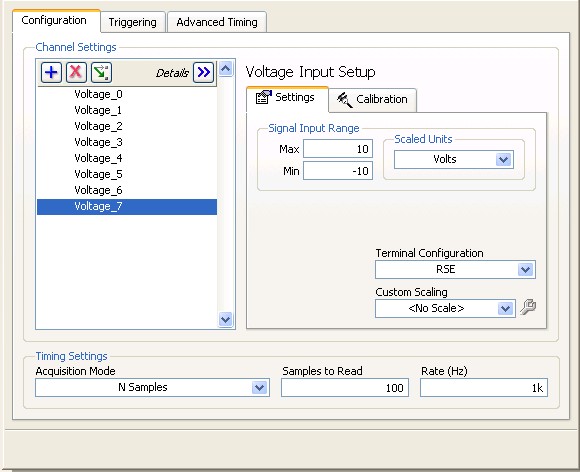
To implement your task in your LabVIEW code:
- Select the correct name for your DAQmx task from the “task/channels in” constant of the Start DAQmx Task.vi
- Run
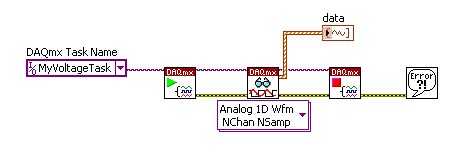
**This document has been updated to meet the current required format for the NI Code Exchange.**
Regards,
Dan King
Example code from the Example Code Exchange in the NI Community is licensed with the MIT license.


- Mark as Read
- Mark as New
- Bookmark
- Permalink
- Report to a Moderator
谢谢


- Mark as Read
- Mark as New
- Bookmark
- Permalink
- Report to a Moderator
What do I have to do to use a task in CANoe? Is that possible?

