Reading Excel Data Programmatically Using the Report Generation Toolkit
- Subscribe to RSS Feed
- Mark as New
- Mark as Read
- Bookmark
- Subscribe
- Printer Friendly Page
- Report to a Moderator
Products and Environment
This section reflects the products and operating system used to create the example.To download NI software, including the products shown below, visit ni.com/downloads.
- LabVIEW Report Generation Toolkit
- LabVIEW
Software
Code and Documents
Attachment
Overview:
This simple program is a demonstration of how to use the LabVIEW Report Generation Toolkit to read data from Excel programmatically.
Description:
The first part of the program is a File Dialog Express.vi which asks the user to select the Excel file that he wants to read (use the read_excel_values.xls in the attached zip file). Then the correct worksheet is selected with the "Excel Get Worksheet.vi". This is done with the worksheet index number for the first two sheets and by worksheet name in the last. After each "Excel Get Worksheet.vi" there is an "Excel Get Data.vi" which will grab the data corresponding to the start and end position (or location depending on the type of array) passed into the SubVI. For the 2-D array data types you must give start and end points for the array. For non-arrays you only need to give the location of the cell.
Requirements:
LabVIEW 2012 (or compatible)
LabVIEW Report Generation Toolkit 2012 for Microsoft Office (or compatible)
Steps to Implement or Execute Code:
- Download and Unzip the attached folder "Read Excel Programmatically.zip"
- Open "Read Excel Values.vi"
- Run the VI and a dialogue will appear
- Browse to the excel file you'd like to use, and continue
Additional Information or References:
Block Diagram
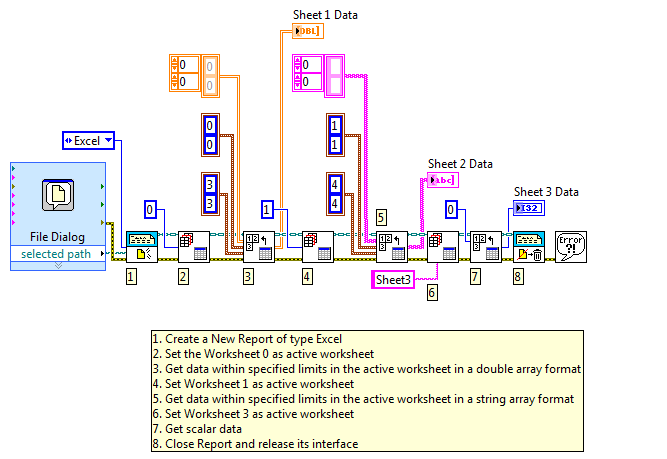
**This document has been updated to meet the current required format for the NI Code Exchange. **
National Instruments
Product Support Engineer
Example code from the Example Code Exchange in the NI Community is licensed with the MIT license.

- Mark as Read
- Mark as New
- Bookmark
- Permalink
- Report to a Moderator
Great code! Thanks for sharing this!
LabVIEW Community Manager
National Instruments


- Mark as Read
- Mark as New
- Bookmark
- Permalink
- Report to a Moderator
Tks too!!


- Mark as Read
- Mark as New
- Bookmark
- Permalink
- Report to a Moderator
got me started quickly with reading Excel files. Thanks!
Seriously concerned about the Labview subscription model


- Mark as Read
- Mark as New
- Bookmark
- Permalink
- Report to a Moderator
Hi !
I was reading the discussion and i didn't find an efficient solution to read a muti-sheets .xlsx file in labview, I want to load the content of each worksheet and get a 2D data array.
Does someone have any idea about how to solve this please?
Thank you.


- Mark as Read
- Mark as New
- Bookmark
- Permalink
- Report to a Moderator
Hello everyone, I hope you guyz are doing well. I need your help, I want to search some integer values which maybe 100 rows and store in one array for further uses. I am confused which one algorithm is working faster in this scenario. If any recommendation or someone already did that type of searching then please help in this problem. Thanks to all.
@Justin_P wrote:
Overview:
This simple program is a demonstration of how to use the LabVIEW Report Generation Toolkit to read data from Excel programmatically.
Description:
The first part of the program is a File Dialog Express.vi which asks the user to select the Excel file that he wants to read (use the read_excel_values.xls in the attached zip file). Then the correct worksheet is selected with the "Excel Get Worksheet.vi". This is done with the worksheet index number for the first two sheets and by worksheet name in the last. After each "Excel Get Worksheet.vi" there is an "Excel Get Data.vi" which will grab the data corresponding to the start and end position (or location depending on the type of array) passed into the SubVI. For the 2-D array data types you must give start and end points for the array. For non-arrays you only need to give the location of the cell.
Requirements:
LabVIEW 2012 (or compatible)
LabVIEW Report Generation Toolkit 2012 for Microsoft Office (or compatible)
Steps to Implement or Execute Code:
- Download and Unzip the attached folder "Read Excel Programmatically.zip"
- Open "Read Excel Values.vi"
- Run the VI and a dialogue will appear
- Browse to the excel file you'd like to use, and continue
Additional Information or References:
Block Diagram
**This document has been updated to meet the current required format for the NI Code Exchange. **


- Mark as Read
- Mark as New
- Bookmark
- Permalink
- Report to a Moderator
Thanks for the helpful tips, however, this only works for one excel sheet at a time. I have a bank of data I want to reporcess because I've updated my code.
Is it possible to read a folder of '.xlsx' files in an iterative process which saves the reprocessed data for each original file?

