Time Stamp DAQmx Sample Clock with NI-Sync Using LabVIEW
 Example_Scrubber_Nian
08-15-2017
12:10 AM
Example_Scrubber_Nian
08-15-2017
12:10 AM
- Subscribe to RSS Feed
- Mark as New
- Mark as Read
- Bookmark
- Subscribe
- Printer Friendly Page
- Report to a Moderator
Products and Environment
This section reflects the products and operating system used to create the example.To download NI software, including the products shown below, visit ni.com/downloads.
- Data Acquisition (DAQ)
Hardware
- LabVIEW
Software
- NI DAQmx
Driver
Code and Documents
Attachment
Overview
The example VI shows how to use NI Sync, along with a Timing & Synchronization board, to Time Stamp the sample clock a DAQmx task.
Description
The program creates an analog input voltage task with a continuous sample clock, along with an NI Sync driver session. After the tasks are started, the NI Sync driver will time stamp the sample clock of the DAQmx Read VI and the data, along with the matching time stamp, will be built into an XY graph.
Requirements
Software:
- LabVIEW 2012 (or compatible)
- DAQmx(or compatible)
- NI-Sync 3.0 (or compatible)
Hardware:
- PXI Chassis
- PXI M-Series or E-Series DAQ board
- PXI-6682 Timing & Sync board
Steps to Implement or Execute Code
- Select the Timing & Sync board you would like to use. Make sure that the board is in the timing slot (slot 2 ) of your PXI chassis.
- Select the DAQmx board you would like to use.
- Select the Sample Clock Terminal of your DAQ board.
- Select the sample rate of your DAQ board that you would like to use.
- Select the number of samples you would like to read. This will also be the number of time stamps you will receive.
Additional Information or References
VI Snippet
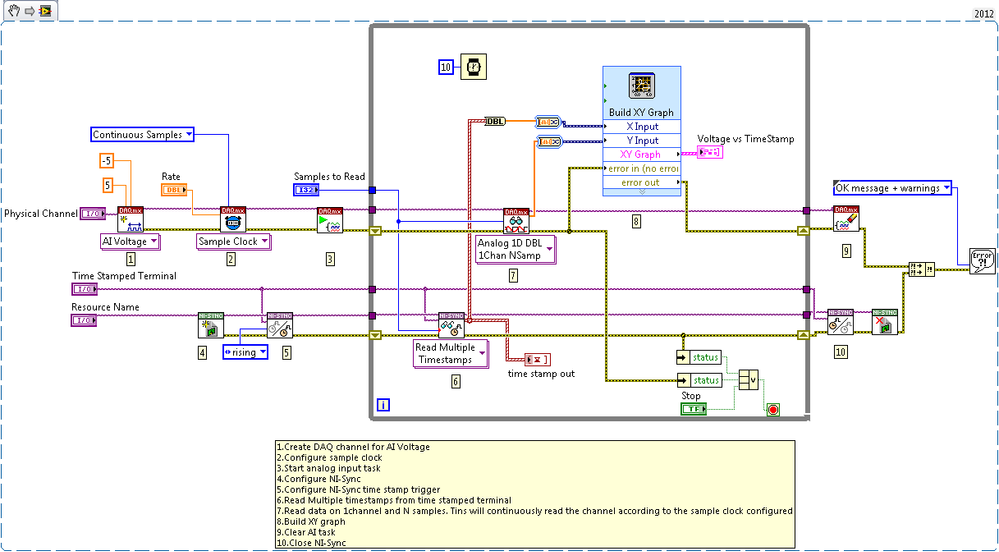
**This document has been updated to meet the current required format for the NI Code Exchange.**
Applications Engineer
Example code from the Example Code Exchange in the NI Community is licensed with the MIT license.


