From Friday, April 19th (11:00 PM CDT) through Saturday, April 20th (2:00 PM CDT), 2024, ni.com will undergo system upgrades that may result in temporary service interruption.
We appreciate your patience as we improve our online experience.
From Friday, April 19th (11:00 PM CDT) through Saturday, April 20th (2:00 PM CDT), 2024, ni.com will undergo system upgrades that may result in temporary service interruption.
We appreciate your patience as we improve our online experience.
Preview Image:
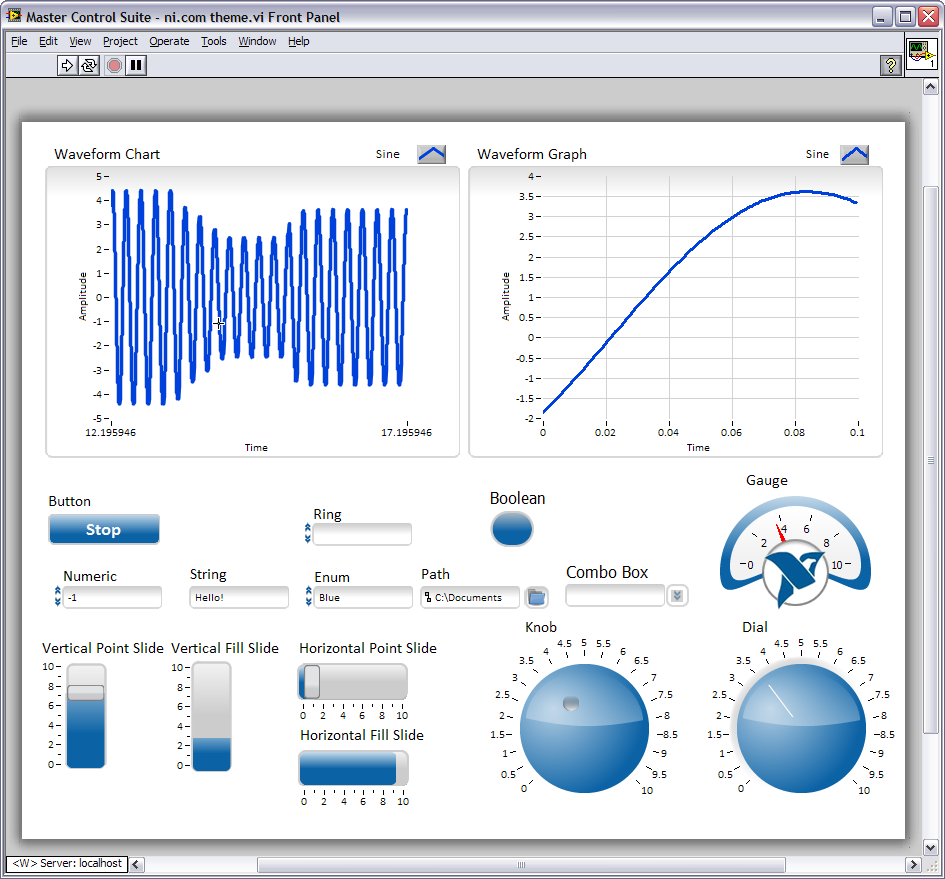
Installation Instructions (manual):
Unzip the attached ni.com theme.zip file in your <LabVIEW Install Directory>\menus\Controls\ folder and then restart LabVIEW to add all the above controls to your palette.
Installation Instructions (automated):
Download the attached ni_lib_ni.com_inspired_controls-1.1.0-1.vip VI Package file and install using VI Package Manager™ (VIPM). VI Package Manager is an installer for LabVIEW VIs and toolkits. It places VIs directly into the palettes, allows you to install VIs into multiple LabVIEW versions, and ensures that any dependency VIs and toolkits (provided in other VI packages) are also installed. VI Package Manager is a trademark and product of JKI Software.
Source Files (optional):
All of the source images used when creating the custom controls are included in the ni.com theme.zip file as Adobe Fireworks PNG files. If you have Adobe Fireworks you can open them up in their original vector for
I created and attached a VI Package (ni_lib_ni.com_inspired_controls-1.0.0-1.vip file above) of these controls that can be installed using VI Package Manager.
Very-very nice pack, thank you very much!
Definetly sweet looking interface.
Really nice looking set of controls. Thanks for sharing.
If you like these, just wait, he has more!
These are great, and thanks to Jim for the VIPM package. Looking forward to a tab, multicolumn listbox, table, filepath, cluster, array.. the whole set!! 
Hey NevD, the file path control should already be in there (I think I just called it "Path"). As for the other types of controls I hadn't started on those I only did what I saw as the most popular ones. At first glance clusters, tables and multicolumn listboxes look easy enough, perhaps even with the existing images. Tab controls look tough as they don't have any replacable images.
OK everyone, I've updated the zip file with a few new controls (namely the ones NevD asked for except the tab control). I've also added a zip file of images that make for good panel backgrounds. Have fun and feel free to post screenshots of the controls in action!
Cool! I've created a new version (1.1.0) of the VI Package file, ni_lib_ni.com_inspired_controls-1.1.0-1.vip, with your new additions.
Thanks Simon and Jim! That was very quick! 
Hi Simon,
It looks cool! do you have it for labview 8.5 version?
No I could not use it. it says: LabVIEW load error code 9: version 8.6 is newer than...
I already attach the files, try it...
thanks but where is the link???
Check the download section above, the title is "NI Theme for 8.5l.zip". I hope it works..
done
Hi SimonH,
thanks alot for such a wonderful and creative work.
However, i went through a page on NI's Website and found 2 really cool UIs developed in LV.
Here's the link
http://decibel.ni.com/content/groups/large-labview-application-development/blog/2009/03/23/professional-user-interfaces-in-labview
You have already posted the controls seen the in the 1st UI on the above page.
I was wondering if you could post the controls used in the 2nd UI. The controls on the Right look extremely beautiful.
Unfortunately I can't post the controls from the 2nd UI as I didn't create them - that UI was developed by one of our customers for their application. However, if it's the numeric control you were interested in I did throw together a similar looking control and posted it over here: http://decibel.ni.com/content/docs/DOC-4614. Again, I have included the source images (this time I created them with Powerpoint) so you can modify, customize and create additional controls.
Hello Simon very nice control but please find some time to create a step wise short demo for creating custom gauge from scratch especially needle color and gauge color range thanks nice work
Very Cool Controls. Wish there was even more of these sets of controls around.
One issue I noticed with the controls. If you were to replace an existing control with one of these controls using the Right-Click>>Replace.. method, then it will replace numerics with a listbox even when you choose to replace with numerics. The buttons and graph/charts seem to work though.
Could someone make this theme available for LabVIEW 8.2.1?
Sorry, but could someone help me?
Is there any possible way that array and cluster controls could be added to this pack?
--------------------------------------------------------------------------------------------------------------------------------------------------------
edit: Looks like its just a link mixup. The link at the bottom under downloads is the right one.
I am definately getting some strange behavior with the different controls when i click on an existing control and try to right mouse click > replace the control with the new sweet looking ni.com themed controls. Replacing buttons and numeric controls are fine. Replacing error controls or arrays on the other hand do some wierd stuff. Any thoughts?
@rex1030 They should already be in there. Which version did you download (I added them around March 25th)?
This is very nice,, thanks for sharing!
Really nice ones. Nice thought
These look great. Do you have an XY graph control? Thanks
This does look great!
Thank you for that, very nice
looks awesome and should be a good starting point for further customizations. Thank you very much.
hi,i am a newer, how I use it,and where I place it?
hi, I am a newer, would you like to tell me how can I use it?
thanks !
Hi catkin,
did you read the two blocks on "Installation instructions"? Really?
More and more exciting!
Hi nice work...They are very good controls....but can you add the boolean controls...
Nice One SimonH, Good Work
Anyone else notice odd behavior with the table control? If I use it as an indicator and write a changing array of strings to it, it will keep displaying the old strings in addition to the new strings, and thus becomes unreadable. The multicolumn listbox works ok, so seems to be something just with table.
Looks very nice!
But I still want to know how to make controls more beautiful.
it's very nice!
hi! First of all thanks a lot for doing this! it is awesome.
I am trying to change the color OFF button but I can not do that in properties. Is there any way to do that?
Thanks a lot.
If you want to change the color of the button in this set, you would need to edit the PNG images for the button states (with an image editor program) and then import the modified iimages into the button (using the Customize mode of the Control Editor).
hi,i'm glad to here from you,last month i joined the NI community and found a lot of resources ,you can search the key word and look for some demos,i have found some video from www.mufenglv.com
Thank you for your kindly help, and in several years age, I have joined www.mufenglv.com. It's a very good to learning and upgrade the NI LabVIEW technology community.


