- Document History
- Subscribe to RSS Feed
- Mark as New
- Mark as Read
- Bookmark
- Subscribe
- Printer Friendly Page
- Report to a Moderator
- Subscribe to RSS Feed
- Mark as New
- Mark as Read
- Bookmark
- Subscribe
- Printer Friendly Page
- Report to a Moderator
EtherNet/IP Driver for Industrial Communication

NI LABS GRADUATE - The NI LabVIEW Driver for EtherNet/IP is a now a released and supported feature available for purchase on ni.com. The released version includes support for LabVIEW 8.5 and newer. You should not use the NI Labs version of EtherNet/IP support in shipping or commercial applications.
The EtherNet/IP driver provides a LabVIEW-based interface to directly communicate over the network with compatible EtherNet/IP devices such as Allen-Bradley/Rockwell PLCs. The driver provides mechanisms for both explicit messaging (in several formats) and I/O data communication. This allows communication and data sharing with a very wide range of PLCs and EtherNet/IP devices in use today.
Explicit Messaging
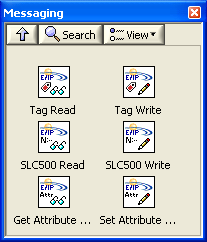
The VIs on this palette use explicit messaging connections to read from or write to a target.
Tag Read/Write and SLC500 Read/Write allow direct access into data fields stored on a PLC. The target must support Messaging class communications using either Logix tag names or PCCC communication to register files. Supported targets of these message formats include PLCs such as Rockwell's SLC 500, MicroLogix, ControlLogix and CompactLogix series.
The Get/Set Attribute Single VIs let you interact directly with individual instances of objects in the CIP object model on an EtherNet/IP device. While some classes of objects are standardized, others are device-specific. You should consult the manual of your device to determine the class, instance, and attributes you need to control your device.
I/O Data
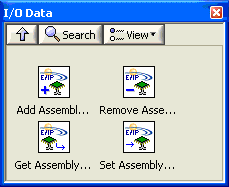
The VIs on this palette allow the LabVIEW system to create an I/O assembly and function as an adapter for a remote PLC. This type of communication is referred to as Class 1 or I/O server communication. The device appears as remote I/O to the PLC and can be addressed within ladder logic as though it were local I/O. Class 1 communication allows the PLC to establish an implicit I/O data connection with the LabVIEW system and repeatedly exchange assembly data at a specific rate. Assemblies are treated as shared memory that is used to produce or consume data to/from the PLC. The data is exchanged asynchronously in the background.
Requirements
The driver is supported in LabVIEW running on Windows as well as LabVIEW Real-Time systems. Supported systems include:
- Desktop PCs
- PXI Controllers
- CompactRIO
- Compact Fieldpoint
- NI Smart Cameras
- Compact Vision System
- Embedded Vision System
- NI Industrial Controller
Note: When running on a real-time controller you must install the driver component to your target first via the Add/Remote Software tab in Measurement and Automation Explorer.
Download the attachment below and let us know what you think. The download attachment has been removed from this page. We'd love to get your feedback!
Natasa


- Mark as Read
- Mark as New
- Bookmark
- Permalink
- Report to a Moderator
Hey,
it will be great if we add some examples.A communication example via EIP from a smart cam with VBAI to an EVS in LabVIEW will be awesome. Because I didnt found a tutorial in the latest vbai manual to EIP.
Kind regards,
Elmar


- Mark as Read
- Mark as New
- Bookmark
- Permalink
- Report to a Moderator
Hi,
Does this work with a Siemans S7 PLC or just Allens Bradley?
Thanks,
Walleye
- Mark as Read
- Mark as New
- Bookmark
- Permalink
- Report to a Moderator
It works on any PLCs or devices that support the communication methods implemented (which have been increasing in number with successive releases). As an example, the Get/Set Attribute Single will let you interact with many CIP objects exposed by a device. You'd have to dig into the Siemens manuals and find out what kind of functionality it supports via EtherNet/IP.
Eric
- Mark as Read
- Mark as New
- Bookmark
- Permalink
- Report to a Moderator
Will an update for LV 2010 be released soon?
National Instruments
Ingeniería de Aplicaciones
www.ni.com/soporte


- Mark as Read
- Mark as New
- Bookmark
- Permalink
- Report to a Moderator
I am also in need of a release to work with LV 2010.
Thanks
- Mark as Read
- Mark as New
- Bookmark
- Permalink
- Report to a Moderator
The latest 1.0.6 update just released now has LV 2010 support natively in the installer

- Mark as Read
- Mark as New
- Bookmark
- Permalink
- Report to a Moderator
Awsome, thanks! I was just about to request the same thing. These work great

- Mark as Read
- Mark as New
- Bookmark
- Permalink
- Report to a Moderator
Hi,
are there any application examples for the use of Assembly-VIs available ?
I have no idea how to use them... for example I can't find a possibility to pass the IP-Adress of the PLC I want to scan ...
Thanks, Martin

- Mark as Read
- Mark as New
- Bookmark
- Permalink
- Report to a Moderator
Hi,
Is it possible to read/write strings in the PLC?
Best Regards Svendsen

- Mark as Read
- Mark as New
- Bookmark
- Permalink
- Report to a Moderator
Is this release compatible with version 7.1?
Best regards,
Joan


- Mark as Read
- Mark as New
- Bookmark
- Permalink
- Report to a Moderator
I do not see a way to address long data types with this. Is there a way?
GHSP


- Mark as Read
- Mark as New
- Bookmark
- Permalink
- Report to a Moderator
Any plans to support 64 bit LabVIEW with this toolkit? If so when? We could really use it.
John

- Mark as Read
- Mark as New
- Bookmark
- Permalink
- Report to a Moderator
Yes, I really am in need of this toolkit working with x64 2010. That would be excellent.

- Mark as Read
- Mark as New
- Bookmark
- Permalink
- Report to a Moderator
Can't read EthernetIP Help.chm! Any luck there?

- Mark as Read
- Mark as New
- Bookmark
- Permalink
- Report to a Moderator
Hi,
In case we have a cRIO with 2 Ethernet Ports, does-it work transparently?
So, do the VIs can work on second Eternet Port, not the primary one?
Of course on PLC side, right IP address would be configured (the one of the second Ethernet Port of cRIO).
Regards
Vincent
Regards
- Mark as Read
- Mark as New
- Bookmark
- Permalink
- Report to a Moderator
VincentR. wrote:
Hi,
In case we have a cRIO with 2 Ethernet Ports, does-it work transparently?
So, do the VIs can work on second Eternet Port, not the primary one?
Of course on PLC side, right IP address would be configured (the one of the second Ethernet Port of cRIO).
Regards
Vincent
Regards
Yes, it should work transparently.
Eric
- Mark as Read
- Mark as New
- Bookmark
- Permalink
- Report to a Moderator
Hi,
Does anybody know which port is used to communicate with the plc?
I like to know it since I have to do some port forewarding on my router.
Regards
Jacob
- Mark as Read
- Mark as New
- Bookmark
- Permalink
- Report to a Moderator
Jacob,
Go to www.rockwellautomation.com and then to the knowledgebase. Look up article 29402 - TCP/UDP Ports used by Rockwell Automation products. I don't know what hardware you're using specifically to answer you more directly, but this list should tell you what you need to know. If you can't access the list, tell me exactly what communications hardware you're using and I can give you the port ranges it uses.
Regards,
Jeff
- Mark as Read
- Mark as New
- Bookmark
- Permalink
- Report to a Moderator
Hello NI EtherNet IP Users and Administrators ,
I am having a problem, that may be related to a bug in the Labview Ethernet IP driver.
I have a Controllogix PLC running an electro/pneumatic/mechanical workstation that also has a LabView application on a PC doing some high speed data acquisition and analysis. The symptom I am experiencing is that if I am online with the PLC and actively monitoring and/or editing the PLC program, while the station is running, the communication between the PLC and the Labview PC via ethernet IP appears to lock up. This requires a complete cold start of the PC to re-establish communications. Simply re-starting the Labview application does not re-establish the connection.
If I am not online with the PLC while the station is running, the communication does not lockup, or at least the occurance frequency is greatly reduced.
I saw that there is a newer release of the ethernet IP driver available, was this created to address a specific problem? If so would upgrading to the newer driver correct my issue? Thanks!
- Mark as Read
- Mark as New
- Bookmark
- Permalink
- Report to a Moderator
I am personally just starting to dig into the IP driver. WE have done some testing with a compactLogix and had no issues yet. But are not putting a heavy load.
I am currently writing a test routine to exercise this in Labview. If anything shows up I will let you know.
- Mark as Read
- Mark as New
- Bookmark
- Permalink
- Report to a Moderator
MWPNCookeville wrote:
Hello NI EtherNet IP Users and Administrators ,
I am having a problem, that may be related to a bug in the Labview Ethernet IP driver.
I have a Controllogix PLC running an electro/pneumatic/mechanical workstation that also has a LabView application on a PC doing some high speed data acquisition and analysis. The symptom I am experiencing is that if I am online with the PLC and actively monitoring and/or editing the PLC program, while the station is running, the communication between the PLC and the Labview PC via ethernet IP appears to lock up. This requires a complete cold start of the PC to re-establish communications. Simply re-starting the Labview application does not re-establish the connection.
If I am not online with the PLC while the station is running, the communication does not lockup, or at least the occurance frequency is greatly reduced.
I saw that there is a newer release of the ethernet IP driver available, was this created to address a specific problem? If so would upgrading to the newer driver correct my issue? Thanks!
Are you using some software like RSLogix5000 on the same PC as the LabVIEW code is running on? If so, then you would likely run into issues because the EtherNet/IP protocol runs on certain fixed ports for certain types of communication (such as adapter I/O communication). Because it relies on fixed ports, only one application on the system can claim usage of those ports. Whichever app starts first that asks for them them will grab them.
Eric
- Mark as Read
- Mark as New
- Bookmark
- Permalink
- Report to a Moderator
Thanks Eric, but that's not the case. I am running the Labview code on a separate pc from the rslogix 5000 software. I am running a pretty much "as fast as possible" communication heartbeat between the labview pc and the plc.
I set a value in the plc and wait for it to get echoed back from the labview in a different plc tag, and when the two are equal I add one to it. In this way I can monitor the health of the connection. If the connection fails I don't run the station.
I have been considering putting a time delay on the heartbeat, so as not to load the network as heavily, but it seems to work just fine except when I am online with the processor using the RSlogix 5000. Actually it seems to work just fine for about two hours at a time even when I'm online with the PLC, but at about two hours it locks up and requires a labview pc restart...
- Mark as Read
- Mark as New
- Bookmark
- Permalink
- Report to a Moderator
It sounds to me like you are "free running" in a sense which does create communication problems. I would definately put in a time delay, even 100ms will make a big difference. I would also suggest doing block reads and writes if you aren't doing that already. Also, the read and write messaging functions have session in and session out ports along with their error in and error out ports. If you don't have those wired together, there is a good chance of having a communication traffic jam. Wiring those together makes sure that only one of those messaging functions works at a time.
- Mark as Read
- Mark as New
- Bookmark
- Permalink
- Report to a Moderator
MWPNCookeville wrote:
Thanks Eric, but that's not the case. I am running the Labview code on a separate pc from the rslogix 5000 software. I am running a pretty much "as fast as possible" communication heartbeat between the labview pc and the plc.
I set a value in the plc and wait for it to get echoed back from the labview in a different plc tag, and when the two are equal I add one to it. In this way I can monitor the health of the connection. If the connection fails I don't run the station.
I have been considering putting a time delay on the heartbeat, so as not to load the network as heavily, but it seems to work just fine except when I am online with the processor using the RSlogix 5000. Actually it seems to work just fine for about two hours at a time even when I'm online with the PLC, but at about two hours it locks up and requires a labview pc restart...
What sort of communication are you using between the LabVIEW side and the PLC? Is it explicit messaging or Class 1 I/O? Also, on the LabVIEW side the driver is completely user-mode code. If you close LabVIEW there is no trace of the code left running. As such there should be no reasons that you should ever need to reboot to get it to work again. Are there any other details about your setup you can share?
Eric
- Mark as Read
- Mark as New
- Bookmark
- Permalink
- Report to a Moderator
There is also a serial interface from the Labview PC to a motor control board. We are collecting accelerometer data from the motor housing while it is running. I originally suspected the serial port was locking up, and I suppose that could be the problem rather than the ethernet ip interface. The correlation between being online with the PLC and the problem still has me thinking ethernet loading however. Could just be a coincidence...
- Mark as Read
- Mark as New
- Bookmark
- Permalink
- Report to a Moderator
Oh, and it's using explicit messaging...
- Mark as Read
- Mark as New
- Bookmark
- Permalink
- Report to a Moderator
Any updates on the port to 64 bit?
John
- Mark as Read
- Mark as New
- Bookmark
- Permalink
- Report to a Moderator
I will be making some changes this evening to try to minimize the ethernet loading while maintaining a more reasonable communication heartbeat rate.
- Mark as Read
- Mark as New
- Bookmark
- Permalink
- Report to a Moderator
Excellent tools !! I think this is the bigger step to establish an Ethernet/IP communication. It opens a big world for Labview. We are using AllenBradley PLCs and some other devices over Ethernet/IP and this tools are working with LabView 2010 very well. Thank you very much
- Mark as Read
- Mark as New
- Bookmark
- Permalink
- Report to a Moderator
I have been playing with these tools for a couple of months now and they appear to work fine - thanks NI. Naturally these tools are marked for internal use only. What are NI thoughts for official release?
- Mark as Read
- Mark as New
- Bookmark
- Permalink
- Report to a Moderator
Hi Fred,
The answer is "soon" 
- Mark as Read
- Mark as New
- Bookmark
- Permalink
- Report to a Moderator
Thanks for the heads-up on the release.
I wondering if you could point me in the right direction regarding using the Ethernet/IP Driver for mutiprocessor communication? I am assuming it is not as simple as making the Tag Read/Writes re-entrant.
Thanks again for a great job on these tools.
- Mark as Read
- Mark as New
- Bookmark
- Permalink
- Report to a Moderator
FredGenett wrote:
Thanks for the heads-up on the release.
I wondering if you could point me in the right direction regarding using the Ethernet/IP Driver for mutiprocessor communication? I am assuming it is not as simple as making the Tag Read/Writes re-entrant.
Thanks again for a great job on these tools.
Hi Fred,
All the VIs should already be re-entrant. You can have any number of operations overlapping simultaneously. Since the explicit communication methods are request/response-based, multiple independent requests can be submitted to the PLC simultaneously and they will complete in less time than completing them serially. The only limitation on the LabVIEW side is that the current code blocks a LabVIEW thread during execution while it is waiting for a response (rather than using LabVIEW occurences) and thus there is some limit to how many will actually run in parallel. How many will depend on how many threads LabVIEW is using (default is based on OS and CPU count, can be overridden by INI token), which execution subsystem you have the calling VI set to run it, etc.
Eric
- Mark as Read
- Mark as New
- Bookmark
- Permalink
- Report to a Moderator
Eric,
I just had a chance to test the reentrancy and everything seems to work fine.
Thanks,
Fred
- Mark as Read
- Mark as New
- Bookmark
- Permalink
- Report to a Moderator
Sooooo....any chance there's a 64bit version of the driver binaries on the horizon? hmm, hmm? inquiring minds want to know
- Mark as Read
- Mark as New
- Bookmark
- Permalink
- Report to a Moderator
Yes, we are looking to have some sort of distribution of a 64-bit beta at some point (possibly outside of NI Labs). Details will come soon.
Eric


- Mark as Read
- Mark as New
- Bookmark
- Permalink
- Report to a Moderator
Its not really clear in the product description for NI-Industrial Communications for Ethernet/IP part # 781656-01. Is the EthernetIP driver a 1 time purchase or a license for every RT system I deploy? What happens when a new version is released? Do I have to pay for updates? Can this driver be part of my volume license agreement?
- Mark as Read
- Mark as New
- Bookmark
- Permalink
- Report to a Moderator
dwisti wrote:
Its not really clear in the product description for NI-Industrial Communications for Ethernet/IP part # 781656-01. Is the EthernetIP driver a 1 time purchase or a license for every RT system I deploy? What happens when a new version is released? Do I have to pay for updates? Can this driver be part of my volume license agreement?
I am not involved in the release of this new component, but my understanding is that it is a one-time purchase for development usage and includes support. I don't believe there is any run-time license needed for deployment aside from what is required for LabVIEW (and RT if applicable) itself. Your guess is as good as mine regarding updates I'd say talk to your NI sales rep for further clarification.
Eric
- Mark as Read
- Mark as New
- Bookmark
- Permalink
- Report to a Moderator
What version is this driver currently at? I have release 1.0.6 and I can't find any information on this driver. If there is a new release I would like to know any bug fixes or new supported items.
Thanks,
Doug

- Mark as Read
- Mark as New
- Bookmark
- Permalink
- Report to a Moderator
The current version of this driver is 1.1. With version 1.1, this product moved from the NI Labs experimental domain, to the paid, released product domain. You can find the product page online at http://sine.ni.com/nips/cds/view/p/lang/en/nid/209676.
National Instruments
To the pessimist, the glass is half empty; to the optimist, the glass is half full; to the engineer, the glass

- Mark as Read
- Mark as New
- Bookmark
- Permalink
- Report to a Moderator
Hi guys,
Is there any evaluation version of
http://sine.ni.com/nips/cds/view/p/lang/en/nid/209676 available? Where can I download it?
Thanks,
Make


- Mark as Read
- Mark as New
- Bookmark
- Permalink
- Report to a Moderator
Hello Make,
You can download it from the ni.com/drivers page:
http://joule.ni.com/nidu/cds/view/p/id/2582/lang/en
Kind Regards,
Thierry
Thierry C - CLA, CTA - Senior R&D Engineer (Former Support Engineer) - National Instruments
If someone helped you, let them know. Mark as solved and/or give a kudo. 😉
- Mark as Read
- Mark as New
- Bookmark
- Permalink
- Report to a Moderator
I posted it to fast. This is the one for device net.
I only find the one titled NI-Industrial Communications for EtherCAT on the driver website.
Thierry C - CLA, CTA - Senior R&D Engineer (Former Support Engineer) - National Instruments
If someone helped you, let them know. Mark as solved and/or give a kudo. 😉


- Mark as Read
- Mark as New
- Bookmark
- Permalink
- Report to a Moderator
I am working on setting up communication with a CompactLogix PLC and I am having some getting started issues. I believe I can use the Tag Read/Write VIs, but I am havin gproblems establishing communications. Perhaps this is a configuration of my PLC issue, but I am not sure. Not sure who to ask for help. Please advise.
Thanks,
Casey
Casey Lamers
Phoenix, LLC
CLA, LabVIEW Champion
Check Out the Software Engineering Processes, Architecture, and Design track at NIWeek. 2018 I guarantee you will learn things you can use daily! I will be presenting!
- Mark as Read
- Mark as New
- Bookmark
- Permalink
- Report to a Moderator
Here is an example of how I did it. Also the key part is the syntax for the Ethernet connection. The syntax is Note: <PLC IP address>,<backplane port number>,<Logix slot number>.
Mine is set to 192.168.1.5,1,0
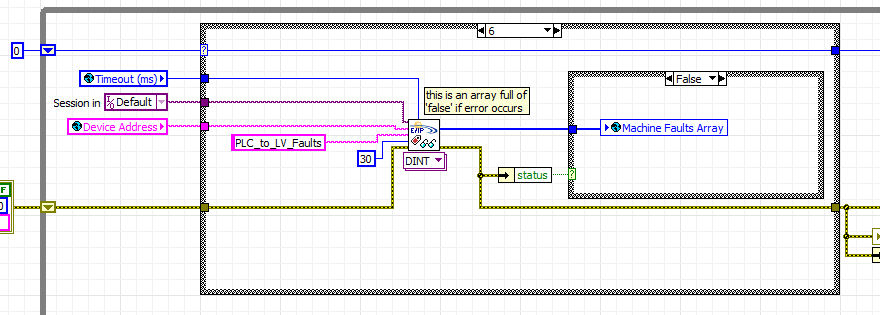
Hope this helps,
Doug

- Mark as Read
- Mark as New
- Bookmark
- Permalink
- Report to a Moderator
Someone has the librarys to download ??? thanksss
- Mark as Read
- Mark as New
- Bookmark
- Permalink
- Report to a Moderator
Hello guillenxm,
Please note the edited message in the original post:
"NI LABS GRADUATE - The NI LabVIEW Driver for EtherNet/IP is a now a released and supported feature available for purchase on ni.com. The released version includes support for LabVIEW 8.5 and newer. You should not use the NI Labs version of EtherNet/IP support in shipping or commercial applications."
Thierry C - CLA, CTA - Senior R&D Engineer (Former Support Engineer) - National Instruments
If someone helped you, let them know. Mark as solved and/or give a kudo. 😉
- Mark as Read
- Mark as New
- Bookmark
- Permalink
- Report to a Moderator
I want to use EtherNet / IP communication with a ABB drive, and just do not know how to use Get / Set Attribute Single VIs?

- Mark as Read
- Mark as New
- Bookmark
- Permalink
- Report to a Moderator
I currently have this running in windows 7 and it works great. Will it work with Windows 10?

