ni.com checkout is currently experiencing issues.
Support teams are actively working on the resolution.
ni.com checkout is currently experiencing issues.
Support teams are actively working on the resolution.
 Example_Scrubber_Stephan
06-09-2017
07:06 AM
Example_Scrubber_Stephan
06-09-2017
07:06 AM
To download NI software, including the products shown below, visit ni.com/downloads.
Overview
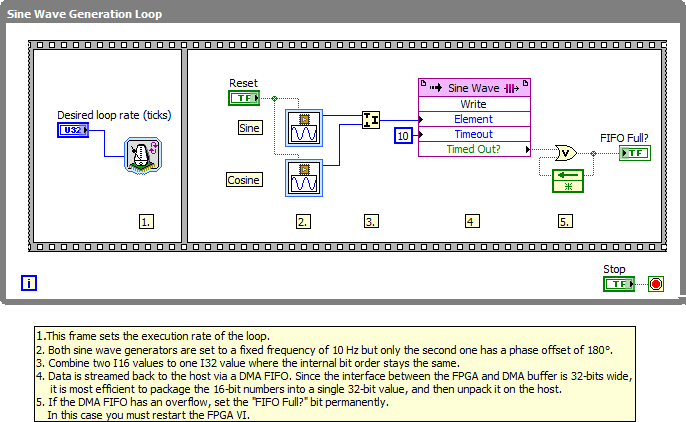
This example demonstrates how to combine two I16 values to send them most efficiently from target to host using a DMA FIFO with U32 datatype. For demonstration purposes signal values are generated by a sine wave generator on the FPGA.
Description
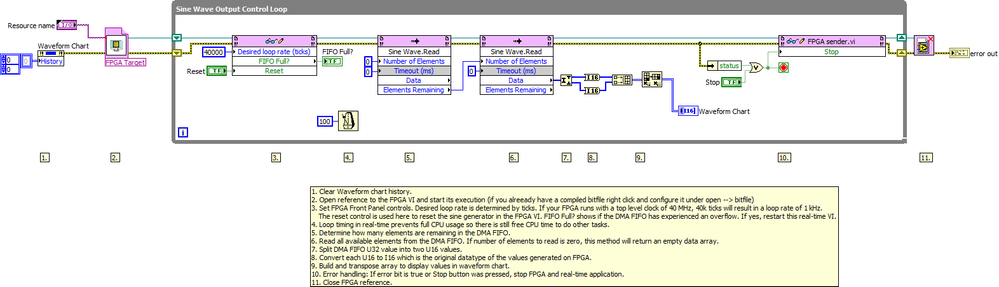
In earlier versions of LabVIEW, the FPGA FIFO is fixed at a U32 Datatype. Since LabVIEW 8.6 any standard type can be used, including fixed point (Release Notes).Also in newer LabVIEW versions the DMA FIFO interface between FPGA and DMA buffer is 32-bits wide. Thus it is most efficient to package 16-bit numbers into a single 32-bit value, and then unpack it on the host. When using a U32 FIFO, it can be confusing when your I16 data gets coerced to a U32 and then Read as a U32 on the host, which requires some careful data conversions. This example shows a way to pack two I16 values into a U32 and then to unpack and continuously show the data on a waveform chart.
This example was built for a cRIO 9118, but can be applied to many different FPGA targets.
Requirements
Software
Hardware
Steps to Implement or Execute Code
Additional Information or References
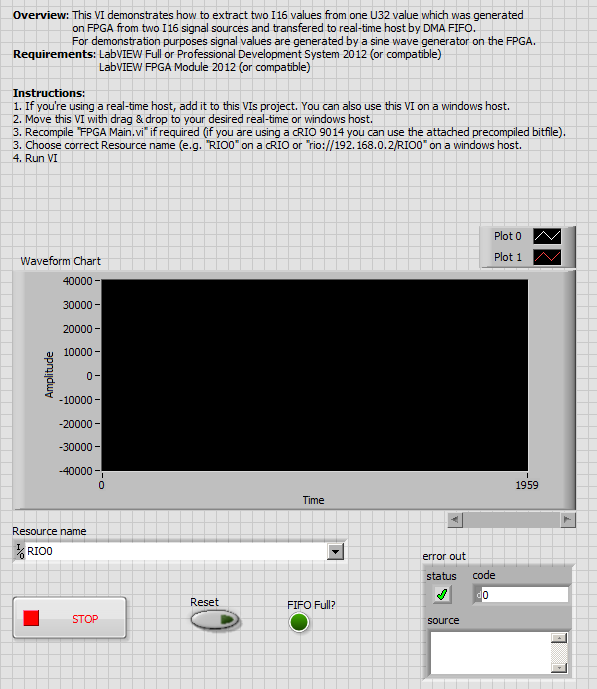
Host receiver:
FPGA sender:
Note: You can modify the chart history length by right clicking on the waveform chart. Also be sure to change the desired loop rate in "Host receiver.vi" to be representative of the rate you are reading on the FPGA. For this example, I was generating data at 1 kHz on my FPGA which has a top level clock of 40 MHz, so I chose 40k ticks as a desired loop rate. If you have another FPGA target, you might have to consider its different top level clock and change ticks for desired loop rate accordingly.
Find more detailed examples about this topic under:
<LabVIEW 201x>\examples\CompactRIO\FPGA Fundamentals\FPGA Math and Analysis\Generation
**The code for this example has been edited to meet the new Community Example Style Guidelines. The edited copy is marked with the text ‘NIVerified’. Read here for more information about the new Example Guidelines and Community Platform.**
Example code from the Example Code Exchange in the NI Community is licensed with the MIT license.
Please leave feedback if you have any comments or suggestions!
add the version numner into the file name
Good call. Original files were for LV 8.6, but this example helps 8.5 users more. I'll convert the files and upload them later today!
Thanks Robbob. I do need the 8.5 version because I cannot open these file. Looking forward to the new files.
Best,
soljiang