Retrigger Analog Input with Analog Trigger Using LabVIEW
 Example_Scrubber_Nian
08-14-2017
10:38 PM
Example_Scrubber_Nian
08-14-2017
10:38 PM
- Subscribe to RSS Feed
- Mark as New
- Mark as Read
- Bookmark
- Subscribe
- Printer Friendly Page
- Report to a Moderator
Products and Environment
This section reflects the products and operating system used to create the example.To download NI software, including the products shown below, visit ni.com/downloads.
- Data Acquisition (DAQ)
Hardware
- LabVIEW
Software
- NI DAQmx
Driver
Code and Documents
Attachment
Overview
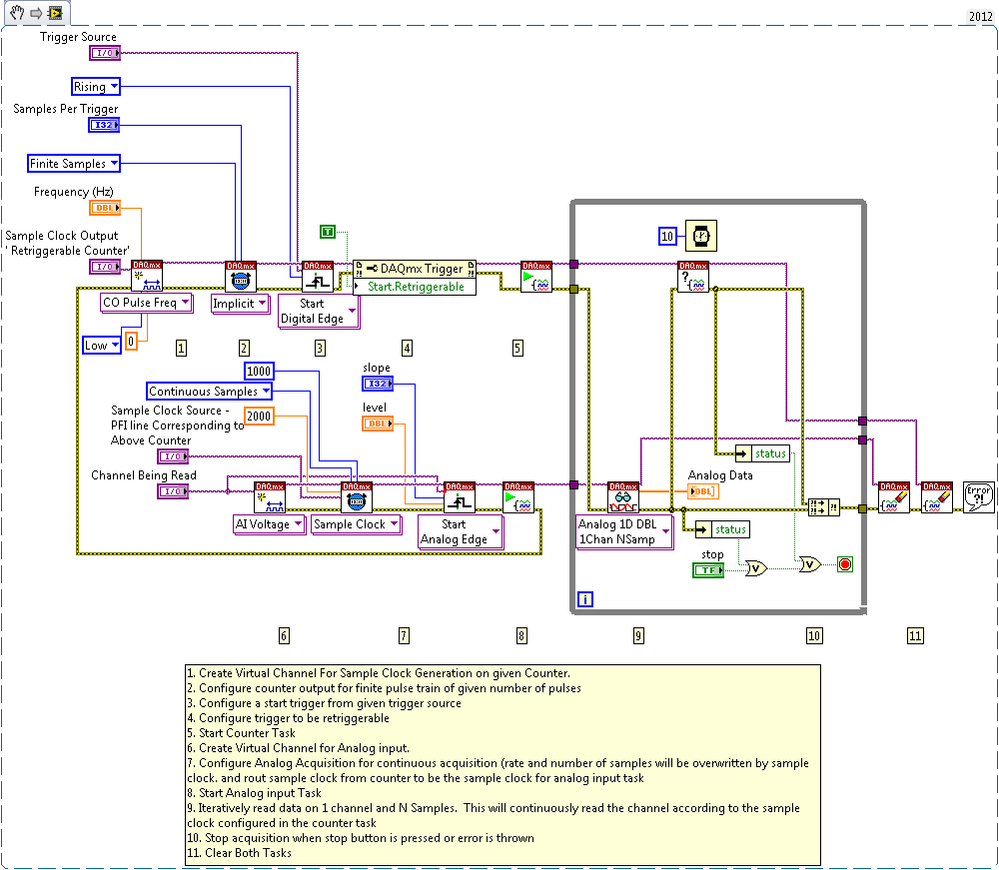
This example VI shows how to retrigger a counter task by using the analog comparison event.
Description
This VI uses the analog comparison event to retrigger a counter task. The counter output is used as the analog input sample clock. This allows you to have a retrigger analog input task with an analog edge trigger.
Requirements
- LabVIEW 2012 (or compatible)
- NI DAQmx 12.0 (or compatible)
Steps to Implement or Execute Code
- Choose the correct resource name for your device.
- Select the number of samples and sampling frequency.
- Set the counter output to use as the sample clock. Verify that the sample clock source is the PFI line corresponding to the counter used. This can be found in the device pinouts.
- Select the analog trigger level and slope that is desired for the trigger.
- Run the VI
Additional Information or References
NI Snippet
**This document has been updated to meet the current required format for the NI Code Exchange.**
Jordan F
National Instruments
Example code from the Example Code Exchange in the NI Community is licensed with the MIT license.

- Mark as Read
- Mark as New
- Bookmark
- Permalink
- Report to a Moderator
The title says Analog Trigger, but the screenshot looks like the counter task has a Digital Trigger.
hmmmmm...
Peter Flores
Applications Engineer


- Mark as Read
- Mark as New
- Bookmark
- Permalink
- Report to a Moderator
The Analog Trigger is configured in the bottom task. The Analog Trigger circuitry inputs an analog signal and outputs a digital signal based on the Analog Trigger configuration (level, hystersis, etc). That digital output signal can then be used to start any task. In this example it is routed to trigger the counter in the top task.


