- Document History
- Subscribe to RSS Feed
- Mark as New
- Mark as Read
- Bookmark
- Subscribe
- Printer Friendly Page
- Report to a Moderator
- Subscribe to RSS Feed
- Mark as New
- Mark as Read
- Bookmark
- Subscribe
- Printer Friendly Page
- Report to a Moderator
Quick Drop Keyboard Shortcut - Create Object from Terminal


The attached Quick Drop Keyboard Shortcut allows you to create a control, indicator, or constant off of whatever diagram terminal you are currently hovering over with your mouse cursor. You can also use this shortcut to optionally set the value of a constant created in this manner.
Create Control/Indicator
1. Hover your mouse cursor over the terminal of a function, subVI, or any other diagram object.
2. Press Ctrl-Space-Ctrl-Q. If you were hovering over an input terminal, a control will be created and wired to that terminal. If you were hovering over an output terminal, an indicator will be created and wired to that terminal.
Create Constant
1. Hover your mouse cursor over the terminal of a function, subVI, or any other diagram object.
2. Press Ctrl-Space-Ctrl-Shift-Q. If you were hovering over an input terminal, a constant will be created and wired to that terminal. If you were hovering over an output terminal, nothing will happen.
3. Optional - Press Ctrl-Space, type a value into the Quick Drop combo box, then press Ctrl-Shift-Q. The constant that is created will have the value you typed. Supported data types for this functionality are Numeric, Boolean (use 't' or 'f'), String, and Path.
Installation Instructions
Save q.vi and q_LocatorCallback.vi in your [LabVIEW 2009]\resource\dialog\QuickDrop\plugins folder. No LabVIEW restart is required.
Additional Notes
- This shortcut is supported on Windows and Linux only. The shortcut uses the Input Device VIs to determine mouse position, and these VIs are not currently supported on Mac.
- The shortcut may not work properly when hovering over an object that has multiple terminals with identical coordinates, like a Case Structure tunnel or a Loop shift register.


- Mark as Read
- Mark as New
- Bookmark
- Permalink
- Report to a Moderator
Doesn't work for me. I downloaded your VIs and installed to my 2009 directory as directed. With an object selected, Ctrl-Space-Ctrl-D and Ctrl-Space-Ctrl-space-D give me a "Data Cache Size" object each time. "Q" gives me "QR Decomposition.vi [NI_AALPro.lvlib]" I've restarted LabVIEW with no improvement. When I press ctrl-space and then click "shortcuts", there is nothing listed in either "front panel" or "block diagram" tabs. I'm using Windows XP SP3. Is there an option that I need to set?

- Mark as Read
- Mark as New
- Bookmark
- Permalink
- Report to a Moderator
Yes, LVSpeak was the problem. Unfortunately, updating the LVSpeak file crashed my Labview and erased the QuickDropWindow.vi. It took me a couple of hours but I finally was able to get the QuickDrop windows working and now ctrl-shift-ctrl-commands give me constant, indicators and controls. All (except for LVSpeak) seems to work now. Thanks!


- Mark as Read
- Mark as New
- Bookmark
- Permalink
- Report to a Moderator
I was just showing this plugin to a co-worker and noticed it is missing it's description in the QD shortcuts mapping window.
------------------------
Certified LabVIEW Architect
- Mark as Read
- Mark as New
- Bookmark
- Permalink
- Report to a Moderator
Yeah, I wrote this in LabVIEW 2009, where Quick Drop didn't have a shortcuts mapping window. 


- Mark as Read
- Mark as New
- Bookmark
- Permalink
- Report to a Moderator
actually, the q.vi restarts LabVIEW


- Mark as Read
- Mark as New
- Bookmark
- Permalink
- Report to a Moderator
Q.vi has the code to restart LabVIEW not other codes inside. @Darren , is something missing? I tried with LV13, 14, 15, 16
Ajay MV


- Mark as Read
- Mark as New
- Bookmark
- Permalink
- Report to a Moderator
As mentioned above, this quick drop shortcut now just restarts LabVIEW. The list of quick drop community short cuts has a shortcut to restart LabVIEW has a shortcut to restart LabVIEW and it also uses a file named q.vi. It appears that somehow the restart file has replaced the file to create an object from the terminal. Any chance of the correct code being reposted?
- Mark as Read
- Mark as New
- Bookmark
- Permalink
- Report to a Moderator
Hey y'all, sorry I didn't see these comments from last year (the ni.com redesign messed up my subscriptions). I have updated the q.vi to be the correct shortcut for this document.

- Mark as Read
- Mark as New
- Bookmark
- Permalink
- Report to a Moderator
Hi Darren, thanks for putting this together. However, it still seems to be buggy to me in LV2017. It does work, but it takes several tries of moving the mouse around relative to the terminal. It seems whatever code is checking for overlap might be a little to specific. Could you please take a look if you get a chance?
Actually, now I see what had happened. I was trying to use the plugin inside a case structure, and apparently it was applying to object terminals in other -not visible- cases which were closer to the mouse than the object in the visible case. I'm not sure of the cause or solution in the scripting as I have yet to touch that at all, but that is what is happening.
- Mark as Read
- Mark as New
- Bookmark
- Permalink
- Report to a Moderator
Yeah, the plugin does have issues with trying to figure out the right terminal on objects inside multi-frame structures. I don't think I ever found a solution for that.
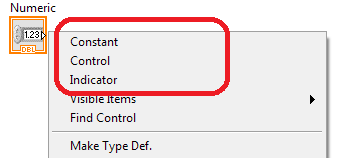
Incidentally, I should point out to anybody reading this thread that I don't really use the Ctrl-Q Quick Drop Keyboard Shortcut anymore. With the advent of right-click plugins in LabVIEW 2015 and later, I have found that the Popout Create Menus plugin is a far more robust implementation to help with this issue. With this plugin installed, you get the 'Constant', 'Control', and 'Indicator' menu items at the very top of the menu whenever you right-click on a terminal, which in my opinion, obviates the need for the Ctrl-Q QD shortcut.
- Mark as Read
- Mark as New
- Bookmark
- Permalink
- Report to a Moderator
Awesome! I didn't know about that but will be implementing it immediately.


