- Document History
- Subscribe to RSS Feed
- Mark as New
- Mark as Read
- Bookmark
- Subscribe
- Printer Friendly Page
- Report to a Moderator
- Subscribe to RSS Feed
- Mark as New
- Mark as Read
- Bookmark
- Subscribe
- Printer Friendly Page
- Report to a Moderator


The attached Quick Drop Keyboard Shortcut allows you to perform all the options in the right-click > Create... menu with your keyboard. You can perform these operations with one or more objects selected.
Front Panel Controls and Indicators
1. Select one or more front panel controls and/or indicators.
2. Press Ctrl-Space.
3. Type one of the following object names: local, reference, property, invoke, control, indicator, constant.
4. If you're in LabVIEW 2009, press Ctrl-Shift-A. Otherwise, press Ctrl-A. The appropriate object will be created for each front panel control and/or indicator you selected, just as if you had right-clicked each object and chosen Create > [object].
Block Diagram Terminals, Constants, and Wires
1. Select one or more block diagram terminals, constants, and/or wires.
2. Press Ctrl-Space.
3. Type one of the following object names:
- local, reference, property, invoke - Valid only for block diagram control terminals.
- control, indicator, constant - Valid for any block diagram terminal (control terminal, loop iteration terminal, etc.), constant, or wire.
4. Press Ctrl-A. The appropriate object will be created for each block diagram object you selected, just as if you had right-clicked each object and chosen Create > [object].
Installation Instructions
LabVIEW 2009 - Save a.vi in your [LabVIEW 2009]\resource\dialog\QuickDrop\plugins folder. No LabVIEW restart is required.
LabVIEW 2010 and later - Save Create Menu Options.vi in your [LabVIEW 20xx]\resource\dialog\QuickDrop\plugins folder. No LabVIEW restart is required.
Additional Notes
- There are a number of "shorthand" commands recognized for each object type. For example, you could type ctl instead of control. View the diagram of a.vi or Create Menu Options.vi to see all supported shorthand commands (or add your own).


- Mark as Read
- Mark as New
- Bookmark
- Permalink
- Report to a Moderator
Darren,
I'm working on a new Actor Framework project with a large number of User Interfaces. For each user interface, I need to create references for all the FP controls that the AF will call, PLUS front panel controls to drop into the UI class private data.
The a.vi you posted worked perfectly for creating the references, but not for creating the named typdef controls I use for AF UIs and other inter-process communiction use cases since control reference constants inherit from Node, not Constant. I added two things to a.vi for your consideration: const/ctl/ind handling for ControlReferenceConstant BD nodes, and an AF-specific (mostly) handler to create the reference and the control (ctl-space » actorFrameworkUI | af | afui | ui » ctl-a). Let me know what you think...
- Mark as Read
- Mark as New
- Bookmark
- Permalink
- Report to a Moderator


- Mark as Read
- Mark as New
- Bookmark
- Permalink
- Report to a Moderator
Darren,
This shortcut works in LV2011 if I leave it named "a.vi," but if I rename it with a name longer than one character it does not show up on the quick drop Ctl-Key Shortcuts tab. Any idea why?


- Mark as Read
- Mark as New
- Bookmark
- Permalink
- Report to a Moderator
Allow me to play fill in for the "other" Darin. I tested this in response to another question, it seems QD looks for one of two (at least) things to determine which which shortcuts show up in that menu:
1. The specification of the default key in the VI description: PLUGIN_DEFAULT_SHORTCUT: x
2. VIs with a single letter name such as a.vi (this keeps backwards compatibility with LV9 shortcuts)
Type checking the VI occurs at runtime.

- Mark as Read
- Mark as New
- Bookmark
- Permalink
- Report to a Moderator
I just updated this document with a new and improved version of the plugin for LabVIEW 2010 and later that gives the VI a more descriptive name, and assigns the same default shortcut to it. The new version also removes the requirement of pressing the [Shift] key for FP operations, as I added the ability for plugins to know where they were launched from (FP or BD) in LabVIEW 2010.


- Mark as Read
- Mark as New
- Bookmark
- Permalink
- Report to a Moderator
Hey Darren, I really like this plugin but have one minor suggestion. Any way you can have the created items not drop on top of one another right in the center of the complete block diagram but rather in the center of the visible part of the block diagram spaced apart a little?


- Mark as Read
- Mark as New
- Bookmark
- Permalink
- Report to a Moderator
How do you select a terminal on the block diagram? I hope this is just something simple I'm missing and there is an easy answer (:
I can create a short wire hanging off of the terminal, double clicking to leave it hanging, then select that to quick-drop a control/constant/indicator, but that kind of defeats the purpose... Even switching out of the cursors auto-select of the spool tool with the shift-rightclick menu I can't figure out how to select a terminal.
-Carl
- Mark as Read
- Mark as New
- Bookmark
- Permalink
- Report to a Moderator
crwecker wrote:
How do you select a terminal on the block diagram?
The "Block Diagram Terminals" in the description is referring to control and indicator terminals. If you want a way to create stuff off an arbitrary node terminal, check out this shortcut, which only requires hovering over the desired terminal before invoking the shortcut.
- Mark as Read
- Mark as New
- Bookmark
- Permalink
- Report to a Moderator
Wonderful! Thanks Darren! That was exactly what I was looking for.

- Mark as Read
- Mark as New
- Bookmark
- Permalink
- Report to a Moderator
Great shortcut, it helped me a lot to create mainly references from FP controls.
Here some comments/improvement propositions/questions:
- I had the same issue as StephenKM (in LV2012) having multiple created items on top of each other and just noticed now, that in LV2013 this is resolved and they are placed spaced from each other. Thanks Darren! What would be also nice is to have the created items selected after the creation to be able to directly continue working on them, e.g. aligning, moving terminal labels etc without need to select them by mouse before.
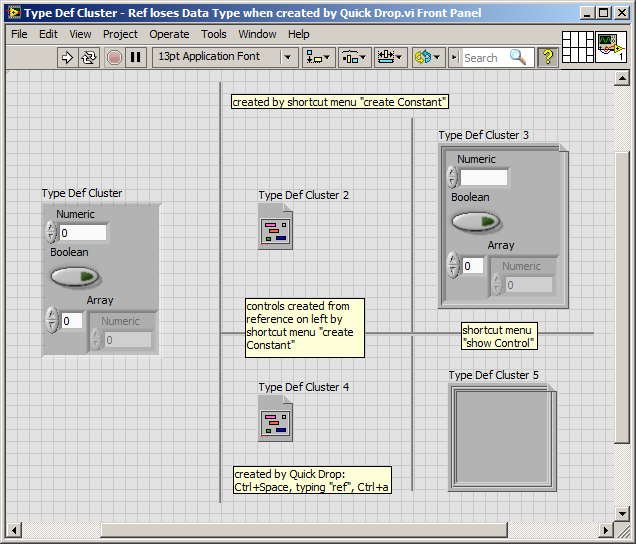
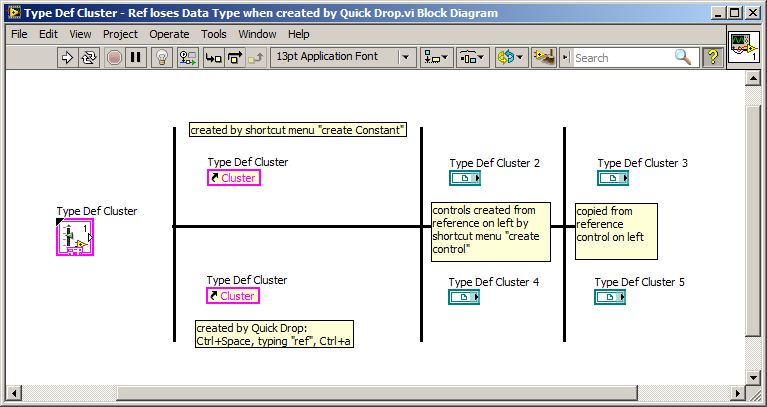
- A real issue for me is this, when creating a reference from a type def cluster by Quickdrop Ctrl+Space, typing "ref", Ctrl+a, the cluster Data Type information gets lost. This issued for me in running but not compilable code. I used the created references for dynamic registration, bundling a bunch of references before the registration in a subvi. I was searching quite some time to find the issue of my compile build error 1502 and found the lost type def data information only by showing the control instead of the icon. I wondered whether you Darren are aware of this? Added an example vi printscreen, hope it's understandable.
- Mark as Read
- Mark as New
- Bookmark
- Permalink
- Report to a Moderator
Thanks for the feedback, David. I have updated the shortcut to have the created items be selected after pressing Ctrl-A, such that you can align them, move them, etc.
As for the data type information problem, I have determined that this is a bug with the scripting operation used to create the control reference. I have filed CAR 439889 on this issue. Unfortunately I am unaware of any workarounds for the issue at this time.
- Mark as Read
- Mark as New
- Bookmark
- Permalink
- Report to a Moderator
Wow Darren, that was fast! I tested and it works now very intuitive for me, having all items selected after their creation by Quick Drop.
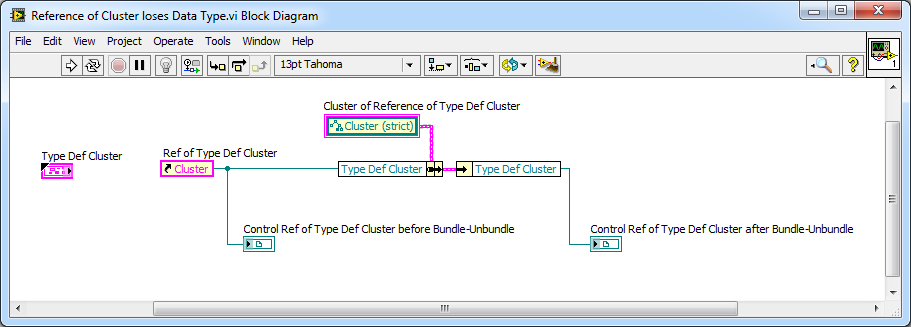
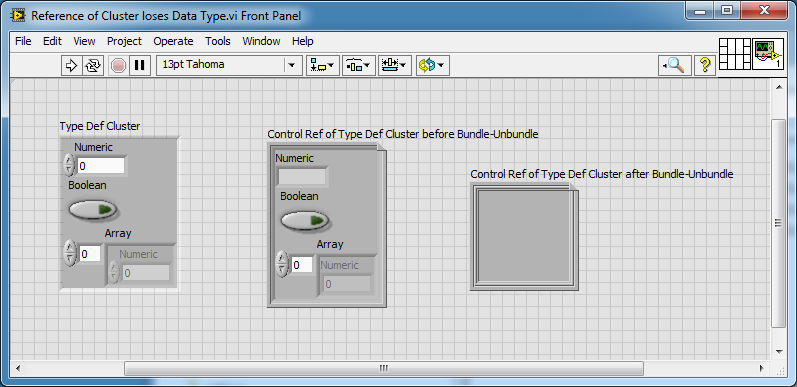
About the reference of a cluster topic. Thank you for reporting the bug. I wonder if it's not even a more global issue than just in scripting. In the example added in this post, a reference of a type def cluster is bundled, then unbundled and the data type information is lost like in scripting. I could imagine this behavior is related? (Let me know if I should post this somewhere else...)
- Mark as Read
- Mark as New
- Bookmark
- Permalink
- Report to a Moderator
I don't think they're related...the output of the Unbundle By Name function will by typed based on the "Cluster (strict)" reference you have in the cluster constant wired to Bundle By Name. This constant does not contain the specific type of the cluster control on the front panel, unlike a Control Reference constant created directly from the control.
- Mark as Read
- Mark as New
- Bookmark
- Permalink
- Report to a Moderator
Ok, if it's like this. I would have expected a constant created from a control reference of a type def control to keep the data type of this original type def control... Very weird is then, that for wires unbundled from constants of type def'ed clusters I get these 1502 compile errors, and for reference wires of other controls classes there isn't this problem. That's why I thought the scripting and my compile issue could be related. But enough of non related discussions on this page. 
PS: allow me one more general question: why isn't it possible to post a vi on these community pages. I have the impression I can only post images or videos, but to explain something related to LabView it's probably the easiest thing to make this with a vi, no? 
- Mark as Read
- Mark as New
- Bookmark
- Permalink
- Report to a Moderator
If you want to write a detailed post about the 1502 error on the NI Forums (forums.ni.com), then we can get an AE to look at the issue to decide if it needs a CAR.
I agree about the attachment issues on the NI Community site, there have been multiple times in the past where I wanted to attach a VI to a reply but could not.
- Mark as Read
- Mark as New
- Bookmark
- Permalink
- Report to a Moderator
Hi Darren, 3 months later... FYI, I shortly tried to reproduce the issue by a demo vi, but there I didn't encounter the compile error 1502. I should have reduced the original vi with that cluster reference register compile issue directly to isolate the problem. If ever I encounter it again, as we have some similar frameworks, I'll post it.

