- Document History
- Subscribe to RSS Feed
- Mark as New
- Mark as Read
- Bookmark
- Subscribe
- Printer Friendly Page
- Report to a Moderator
- Subscribe to RSS Feed
- Mark as New
- Mark as Read
- Bookmark
- Subscribe
- Printer Friendly Page
- Report to a Moderator
I posted this originally in the discussion forums - but I think it really belongs as a document.
I got this "free" home energy monitor from my energy supply company. It's actually developed by Current Cost www.currentcost.com. Two basic parts. A current clamp with a wireless transmitter which you fit over the incoming supply cable plus a display unit which you can site anywhere in the house. This unit displys current power, and (if you put in the per kWHr cost) the cost per and per month of the current power consumption. It also keeps track of historical data and temperature. Of interest to the DIY LabVIEW developer - it has a serial port on an RJ45 connector. So I bought the serial - USB cable from their ebay shop. Plugged it in. And after googling for the driver (their new website is much better), fired up a simple LV VI and grabbed some data.
Turns out the device transmits a set of data in an XML format every 7 seconds or so. It is a very simple format and - although I might convert it to the LabVIEW XML library later - for now I just parse that string with standard string handling functions. (Look.....it's not that the XML library is hard to use... its just overkill for this....anyway I first learnt LabVIEW 15 years ago and I can "do" the string functions in my sleep....aaahhhh yes that's "real" LabVIEW programming...from the GPIB era... when there were only a few instruments drivers....ooops sorry drifted off for a moment there). On further reflection - I am going to stick to the string functions - moving to the XML library will make the app Windows specific. There is no reason this shouldn't work on MacOS or Linux.
So I now have a little LV program that gets the data and displays it graphically. (see screen shot below). Also used it with the built in web server so I can check on it remotely.
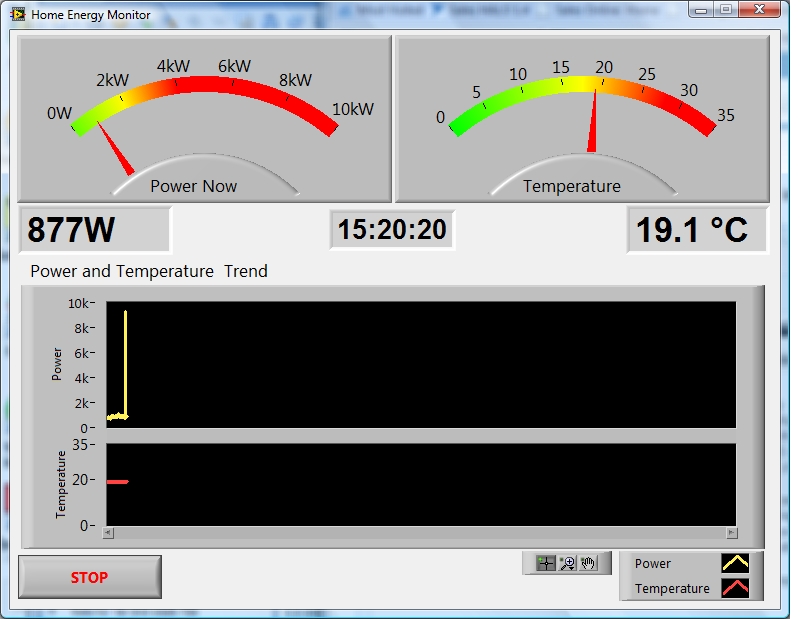
Now - the point behind this is ....once you start monitoring power usage you want to reduce it. To do the monitoring with LabVIEW needs the PC to be on and that consumes around 100W... all the time ... and that costs - you get the idea. So next step is to get this working on my home built Windows Home Server system, which is power optimised and is on all the time. Then - add some proper historical logging and long term trending, send usage email reports, text message alerts. Perhaps it could automate yelling at the children when power usage goes over a certain limit It's at this point that your other half starts to mutter - "LabVIEW all day and now all night.... you're addicted!".
Oh well output of the addiction is attached. ("Home Energy Monitor.zip")
Update
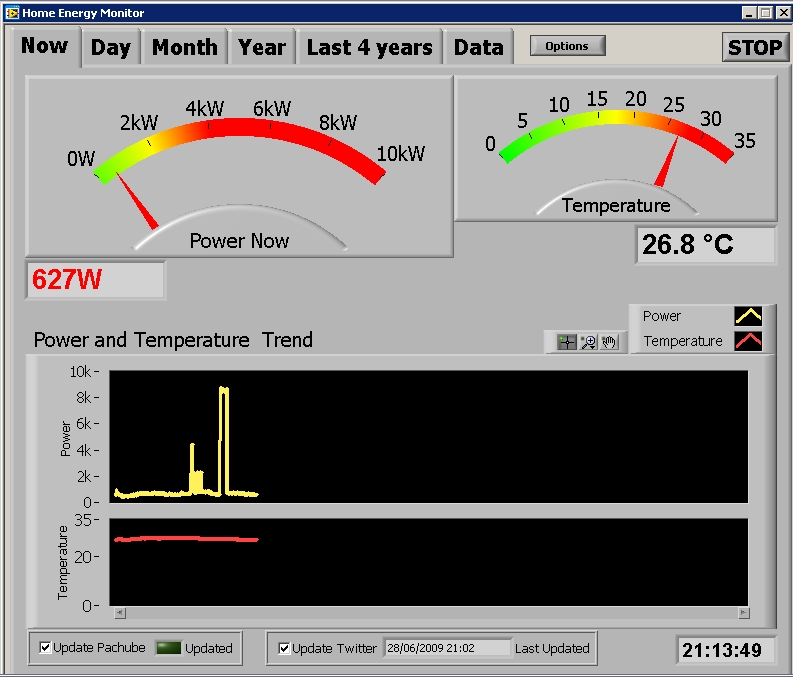
The original Home Energy Monitor program has now been updated. Not really tackled much of my "Version 2 feature list" except for a couple of minor mods too make it work OK on Windows Home Server (which is a thinly disguised Windows Server 2003). But I have added the following:
- Options dialog box with storage and retrieval to an INI file
- Read and Display history data stroed on CurrentCost
- Publishing of data to Pachube ("patch-bay" for sensors uses the VIs I already uploaded see How to connect your LabVIEW app to Pachube
- Publishing of energy consumption (2hr and 24h) and high power alarm status to Twitter
- Read and Display 2nd and 3rd input channels on CurrentCost Classic
This new version is attached below as "Home Energy Monitor-4.ZIP" and see screenshot below
It is an interesting experiment and an evolving "meme" - this idea of bringing together personal energy use and social networks. It is really powerful to be able to compare our energy profile against other homes in UK and around the world.
I am questioning whether running this on the Windows Home Server machine is really the best from an energy efficiency standpoint. Having the program has given me much greater insight into our energy usage and looks like it has stimulated at least a 15% reduction. But it now looks like at least 20% of our background electricity use is down to the server. I am now looking at running this on a really low power (15W) machine - but it ships with Xubuntu Linux - but apparently it will run XP. I will get around to testing the app on Linux at some point.
Another potentially big job is to get the program working with the new CC128 "Envi" device. This has much expanded I/O, the imminent luanch of indvidual device monitors and even an OEM/"hobbyist" board with 2 AI and one DI which can be paired with a channel.Slightly annoyed that the new device's XML output format is not an extension to the original but is different in structure.
Note - latest version is attached as Home Energy Monitor-4.ZIP
Update - 5th August 2009
Breaking news - the application has now been tested on Linux. The project as attached below will open and run in LabVIEW on Linux although depending on what fonts you have instlled and how your distro handles them, you may have to makes some cosmetic tweeks. This was tested on OpenSUSE 11.0 with LabVIEW 8.6.1. This is one of the officially supported distros so getting LabVIEW and NI-VISA installed was no problem. (I recommend using NI-VISA 4.5.0 and above with this version of OpenSUSE)
The app as it stands does try to detect whether it is running as a standalone program or in LabVIEW itself as this affects how the app stops. Right now this detection doesn't work correctly on Linux (not a bug in LV but an issue in my code) so when you hit the stop button it will shut down LabVIEW! A fix for this will be in the next version.
It would be great if someone could try this on a Mac and let me know if it works!
Update - 21st December 2010
In the newsletter that's just gone out the Home Energy Monitor got number 1 in top 5 Example Codes for 2010!
Now I feel guilty about lack of updates.
First - if you use the program you will have noticed that since August the Twitter functionality stopped working. Twitter changed how apps are authenticated from very simple to pretty complex. For now - you will just have to turn Twitter updates off whilst I try to get my head around OAuth (or find someone inthe LabVIEW community who has done it already).
Second - I have actually been working on support for the Envi or cc128. Think it's basically working. Needs some more testing which takes longer because of how the history now gets updated. Will continue testing and cleaning it up and then hope to post a new version that supports both Classic and Envi in new year.
Update - 18th November 2014
At the request of one member of the community - I have now posted VI's with support for the later CurrentCost Devices like the Envi. I cannot guarantee that these work perfectly with the latest devices as my newest CurrentCost is over 4 years old. At least they will give some indication of how to accomodate the changes to the protocol - especially how the longer history functionality is managed.

- Mark as Read
- Mark as New
- Bookmark
- Permalink
- Report to a Moderator
This is awesome. I love the concept of using social networking for machine communication. I am thinking about adding a Twitter output from the sprinkler system. Thanks for posting this, keep up the DIY work


- Mark as Read
- Mark as New
- Bookmark
- Permalink
- Report to a Moderator
Current Cost www.currentcost.com home energy monitor is a product for the UK market. However, they do sell a unit for the USA, which has 2 CT clamps. http://www.currentcost.net/


- Mark as Read
- Mark as New
- Bookmark
- Permalink
- Report to a Moderator
Are there any other monitors made in the USA ?

- Mark as Read
- Mark as New
- Bookmark
- Permalink
- Report to a Moderator
The SRE device looks like a CC128 Envi which has a different output format than the Classic. This isn't currently supported by my Home Energy Monitor. I now have access to one of these - so this will come at some point - just have to hide my LabVIEW addiction from my wife for a while! If you get one of these - I suggest you use my code as a start and get into DIY LabVIEW!
- Mark as Read
- Mark as New
- Bookmark
- Permalink
- Report to a Moderator
In a previous comment David Wisti pointed out the SRE device which is actually a CurreCost Envi see my comments on that. Otherwise I haven't really surveyed what's available in US. The key to this is finding a device that can beconnected to a PC. I have seen stuff on the Web about The Energy Detective (www.theenergydetective.com). This can beconnected via USB - however their API is not public but I think you can request to get access to it. You could use my code as a starting point but then you would have to DIY it from there!


- Mark as Read
- Mark as New
- Bookmark
- Permalink
- Report to a Moderator
There's a lot of companies that make such (or similar) energy monitors (in the USA) e.g. http://www.energyinternet.com/ , http://www.agilewaves.com/ , http://www.getgreenbox.com/ , http://www.energyhub.net/ , http://www.theenergydetective.com/ and more... but if you want to write your own applications to play with the data, make sure that you get a device that can communicate with a PC and allow you to read the data in user-friendly format.
- Mark as Read
- Mark as New
- Bookmark
- Permalink
- Report to a Moderator
Ian,
Once I receive the CC128, I plan on using your code as the starting point. I think SRE has the classic too but I wanted to get the new one. I looked at other devices here in the USA but none seem to have a public API like the currentcost meter. Plus you can measure 3 phase with this meter, if I get another CT clamp, which might come in handy some day. I think you can upgrade to the CC128 without having to get a new transmitter for only £22.50.

- Mark as Read
- Mark as New
- Bookmark
- Permalink
- Report to a Moderator
Sorry to ask newbie questions, but when I download "Home Energy Monitor-4.ZIP" I don't understand how to install on my Vista setup. All there is are .vi files and other types of files which Vista says it doesn't recognise, and none of them are .exe files. Once I've downloaded "Home Energy Monitor-4.ZIP" and unzipped it, what do I do?
- Mark as Read
- Mark as New
- Bookmark
- Permalink
- Report to a Moderator
Thanks for downloading my Home Energy Monitor example program for National Instruments LabVIEW. It is intended for existing users of LabVIEW who like to DIY their own solutions to problems. LabVIEW is a graphical programming language used by engineers and scientists to develop measurement, control and embedded system software. If you are an academic or student you may have access to LabVIEW via your university or school. Also, if you are a student you can get hold of the LabVIEW Student Edition at price that suits the student pocket. Otherwise you can evaluate LabVIEW using the resources at ni.com/trylabview. The "Home Energy Monitor" program is supplied as LabVIEW source code - so you will need LabVIEW to get it working. Thanks again.

- Mark as Read
- Mark as New
- Bookmark
- Permalink
- Report to a Moderator
My CC128 arrived today and I have LabVIEW showing live data. Historic data looks interesting as it's only sent every 2 hours and then it's in bursts every 10 seconds. When I get my head around this I'll look to modify your code for the CC128.
- Mark as Read
- Mark as New
- Bookmark
- Permalink
- Report to a Moderator
Stephen
Let me know how it goes. I also received a CC128 (Envi) via a free deal
with EON - I signed up for their Energy Fit package. The new history
format addresses many of the shortcomings of the one on Classic but it is
more complex and I haven't found the time yet to mod the code.
Ian


- Mark as Read
- Mark as New
- Bookmark
- Permalink
- Report to a Moderator
This is a great project! The kind of thing I do of an evening (I've already had the "LabVIEW all day and now all night as well diatribe).
Don't mean to be naieve, but I'm curious: why would a US home require two current clamps? Thanks.
- Mark as Read
- Mark as New
- Bookmark
- Permalink
- Report to a Moderator
Yes. This is source. Do you have LabVIEW installed? If not you'll be stuck.
I guess once the guys have "finished" (in my experience, there's no such thing as "finished") they might knock out an executable and an installer.
- Mark as Read
- Mark as New
- Bookmark
- Permalink
- Report to a Moderator
Hi Ken.
Many US homes will have both 120V and 240V supplies. 240V is used for high demand appliances like air con, dryers or cookers. Hence the need for 2 clamps in US.
I have asked several times about using the program without LabVIEW. My original intention was to provide something for fellow LabVIEW addicts to play around with. I was almost "finished" at one point - then they came out with the CC128!
- Mark as Read
- Mark as New
- Bookmark
- Permalink
- Report to a Moderator
Thanks, Ian. Didn't know that. I wondered if the US maybe had a 3-phase option like we have in the UK.
Looks like I need one of these gubbins. Not that there’s anything I can do about my energy consumption, but it looks like a beezer toy!
- Mark as Read
- Mark as New
- Bookmark
- Permalink
- Report to a Moderator
I've spotted the transmitter only for sale on eBay. Presumably to make life awkward, the serial port is on the receiver, so I need both units?
- Mark as Read
- Mark as New
- Bookmark
- Permalink
- Report to a Moderator
Ken, once you install such device you'll do anything to lower down the number it shows. I can almost guarantee you'll be running from socket to socket turning things off. 
- Mark as Read
- Mark as New
- Bookmark
- Permalink
- Report to a Moderator
Yes - you need the battery powered transmitter that you plug the current
clamp(s) into, as well as the display which has the serial port on it.
- Mark as Read
- Mark as New
- Bookmark
- Permalink
- Report to a Moderator
And because the app posts to Pachube and/or Twitter, you will find
yourself reaching for the phone to find out why your house is using many
kw just after your kids and/or your better half get home
- Mark as Read
- Mark as New
- Bookmark
- Permalink
- Report to a Moderator
I'm at a lost as to why im getting updates for this forum topic sent to my email account. I'm a member but i did not register for this?
- Mark as Read
- Mark as New
- Bookmark
- Permalink
- Report to a Moderator
You can turn email notifications off either for individual documents or
for the whole group.
For example
- to turn them off for just this document
Go to the page for the document -
http://decibel.ni.com/content/docs/DOC-5425
In the Actions box (top right) - click the link "Stop email notifications
"
-to turn them off for all documents in the DIY LabVIEW Crew group
Go to the page for the group -
http://decibel.ni.com/content/groups/diy-labview-crew
In the Actions and Notifications box (bottom left) - Click the link "Stop
email notifications "
Hope this helps
Ian
- Mark as Read
- Mark as New
- Bookmark
- Permalink
- Report to a Moderator
Managed to work out how to read the history data from the CC128 and have an app running that shows current data and the history similar to the above example. I did borrow your pachube code and now have it updating my feed (http://www.pachube.com/feeds/9864). My code only reads sensor 0 (whole house) as I only have one meter and they don't appear to have released the IAM yet.

- Mark as Read
- Mark as New
- Bookmark
- Permalink
- Report to a Moderator
I'm impressed with what you were able to do with the program!!!!! Many kudos!!!
Mike

- Mark as Read
- Mark as New
- Bookmark
- Permalink
- Report to a Moderator
Hi Ian,
Nice looking graphs!
Like you, I was keen to be able to have power use alerts via a variety of media (SMS/Twitter etc.) and logging to Pachube but without the need for a 24x7 PC drawing a load of power. Our HAH Project is the resulting solution. http://www.dbzoo.com/livebox/hah - only draws 6W of power.
Derek.

- Mark as Read
- Mark as New
- Bookmark
- Permalink
- Report to a Moderator
Just read about Google PowerMeter API on a blog:
The Google Power Meter API has been officially deprecated as of May 26, 2011 to reflect that it's no longer undergoing active development and experimentation, which is the hallmark of APIs in the Code Labs program. However, we have no current plans to remove functionality for existing users.
http://code.google.com/apis/powermeter/
Coordinated Universal Time (UTC) format string: %^<%Y-%m-%dT%H:%M:%S%3uZ>T
- Mark as Read
- Mark as New
- Bookmark
- Permalink
- Report to a Moderator
If you looking for one of these units for the USA, you can get them from http://www.currentcost.net/. Looks like they have a new web based solution now too.

- Mark as Read
- Mark as New
- Bookmark
- Permalink
- Report to a Moderator
This is great. I really appreciate finding this. I am looking for the driver for the USB cable that works with Windows 10. I see that this system is functional for WinXP, and Win7. Has anyone produced an updated driver for the cable? I am hoping to be able to use my current cost meter with Win10.
Thanks for any help.
