S7 PLC TCP/IP Protocol Reference Example
 MarcoPolo5
 Content Cleaner
11-11-2024
04:26 PM
Content Cleaner
11-11-2024
04:26 PM
- Subscribe to RSS Feed
- Mark as New
- Mark as Read
- Bookmark
- Subscribe
- Printer Friendly Page
- Report to a Moderator
Products and Environment
This section reflects the products and operating system used to create the example.To download NI software, including the products shown below, visit ni.com/downloads.
- LabVIEW
Software
Code and Documents
Attachment
Description
Description-Separate-1Overview
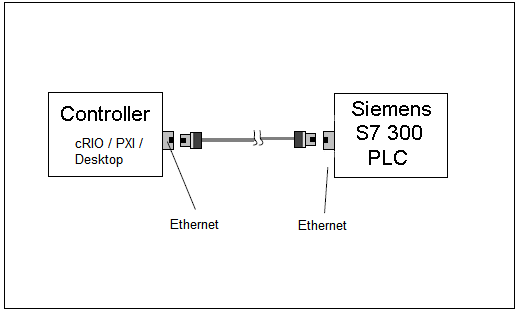
This example provides a library of LabVIEW VI's that can be used to communicate with a Siemens S7-300 PLC via an Ethernet port over TCP/IP.
Description
This example communicates with a S7-300 series PLC through Ethernet TCP/IP - no adapter is needed. The example provides an API to read from / write to registers on the PLC.
To my knowledge, Siemens has never released the details of the S7 protocol. Much of what is publicly available on S7 is based on observations of the protocol by others. There is an open source S7 data exchange package available at http://libnodave.sourceforge.net/ that documents many S7 features.
These VIs were based upon the example posted at http://decibel.ni.com/content/docs/DOC-5467. They were modified by observing and mimicking a S7 data exchange between a protocol converter and a S7-300 series PLC. The observations were accomplished with the wireshark network protocol analyzer, available at http://www.wireshark.org/ and the Wireshark Plugin für S7-Protokoll, available at http://sps-forum.de/showthread.php?p=202763.
Steps to Execute Code
The example contains two top-level VIs: S7Com_Once.vi and S7Com_W+R_Loop.vi.
1.S7Com_Once.vi performs one read or write per execution. It writes to the target PLC from an array of I32, it reads from the target PLC into an array of I32. The number of bytes written is proportional to the number of elements in the array to be written and the transport size parameter.
2.S7Com_W+R_Loop.vi regularly writes to and reads from a pair of DBs in the target PLC. In order to use it, your Step7 PLC project should provide two Data Blocks, DB11 and DB12. See the screen capture image db11&12.PNG for their layout. After downloading the DBs to your PLC, monitor and change DB VAlues with a VAT. As can be seen in the VI, the transfer size is DWORD.
3. For more information, refer to the Read Me included in the download.
Requirements
Software
LabVIEW 8.5 or Later
Hardware
Siemens S7-300
Download Versions
Siemens S7 TCP v3_3 LV 8_5.zip
This code is setup to be fault tolerant; i.e. - if a cable is disconnected or connection is lost the "S7_Error_Reconnect.vi" can be called to cleanup the bad connection and re-open a good connection. There are some optimizations for reading multiple registers from a single DB block.This code is derived from the Serial MPI S7 Protocol Exaple
S7Com_2009_11_06.zip
This code was provided by a fellow developer (thanks!) and uses a slightly different architecture.
Note - the attached files are experimental VIs provided for educational purposes only. No warrantee is expressed or implied. You should test your code and completely understand the implications of writing to or reading from an operating PLC.
**This document has been updated to meet the current required format for the NI Code Exchange.**
Description-Separate-2Example code from the Example Code Exchange in the NI Community is licensed with the MIT license.


- Mark as Read
- Mark as New
- Bookmark
- Permalink
- Report to a Moderator
It's useful,but missing one vi named S7 Read Write Cluster Array.vi. 

- Mark as Read
- Mark as New
- Bookmark
- Permalink
- Report to a Moderator
sorry - missed that VI. Uploaded a new zip file with it included.

- Mark as Read
- Mark as New
- Bookmark
- Permalink
- Report to a Moderator
Very nice code. Thanks for sharing.
Any chance that this will work with the 200 series attached with an Siemens ethernet module ? (S7 224XP PLC with the EM243-1 Ethernet module)
/søren
- Mark as Read
- Mark as New
- Bookmark
- Permalink
- Report to a Moderator
I am not aware of the differences with the CP 243 ethernet module vs the 343 (which this code was used with) - I could not say if it would work or not. If it does not work, you might be able to find some information through http://libnodave.sourceforge.net/ (an open source S7 PLC data exchange code) helpinig find where the LabVIEW code needs to be changed for 200 series communication.
- Mark as Read
- Mark as New
- Bookmark
- Permalink
- Report to a Moderator
This is a very cool code. Thanks. One problem I have is the Read works fine but the Write returns error 66. Is there a port I need to open up or something else to grant access to?
Have you compared this performance wise to DSC with an OPC connection? With just a limitied number of reads it seems pretty fast but I'm wondering if it will slow down with a larger number of register reads or writes.
- Mark as Read
- Mark as New
- Bookmark
- Permalink
- Report to a Moderator
The program uses the port 102 for communication. If you are getting error 66 " The network connection was closed by the peer." - then you might want to double check that you are not trying to write to read-only registers. But I have used this program almost exclusively for reading registers - there could be a bug with some writes. The register read speed should scale linearly with the number of registers desired to read - should be same with OPC - but I have not benchmarked it. My guess is that it would be faster than OPC having the direct call to registers. There are ways to optimize reading large chunks of DB blocks - if you need this, let me know.
- Mark as Read
- Mark as New
- Bookmark
- Permalink
- Report to a Moderator
Hi, thanks for the reply. No luck with the writes yet. I tried testing to some memory bits as well as a few different DBs. They should not be read only registers.
I'd be interested in optimizing reading large chunks of DB blocks. One of the problems with our current PLC program is that the HMI reads read all over the place. We are in the process of consolidating all the HMI ins and outs to a couple data blocks. -Thanks.
- Mark as Read
- Mark as New
- Bookmark
- Permalink
- Report to a Moderator
I added a newer version of the VI's that I have used. I do not have a S7 to test the code with anymore, so if there are bugs and you find a fix, please post them back on this site. The new version (3.1) does have a "optimization" routine that will group reads from the same DB block in a single TCP read. If most of your data is from a single DB, it will be significanly faster. The optimization will not work if you are reading to locations other than DB blocks.

- Mark as Read
- Mark as New
- Bookmark
- Permalink
- Report to a Moderator
Reading working OK. But when try to write, there is error "66". Where is the problem?
- Mark as Read
- Mark as New
- Bookmark
- Permalink
- Report to a Moderator
MarcoPolo5
Thanks again for sharing your code, certainly do apriciate it.
I had a chance to test the S7 communication (EM243-1) yesterday. The TCP/IP vi's connect on port 102 without any problems, but the hex chars :
"TPKT" and "Connect to Adapter" send from the VI "S7_Init_Adapter_TCP.vi" fail to awaken the module since I get a TCP read timeout when trying to read the expected 22 char return answer.
Siemens wants aprox $4000 for the MPI protocol, so I realy wanted to see if I could get away with not investing this amount.
To test that the S7-system was functional, I configured the NI OPC Server with the S7 driver (2 hours trial mode duration). This worked fine and I was able to configure tags for certain addresses from the S7 and directly port them to Shared Variables.
I am trying to implement a GUI for the S7 on a WinCE 5.0 touch panel from IVCDisplays.com running LabVIEW PDA. On this platform I can't operate the NI OPC Server, however, raw TCP/IP calls work just fine so this would be a good entry point to making nice-looking GUI's for S7 installations.
The NI-OPC server was configured with a TSAP 1001, I dont have any idea of what than means, but a S7 guy told me that was needed.
Does anyone out there have a bit more information on the MPI protocol from Siemens ?
Greetings from Copenhagen Denmark.
/søren
- Mark as Read
- Mark as New
- Bookmark
- Permalink
- Report to a Moderator
You can use Wireshark (
http://www.wireshark.org/) to scope the packets on the TCP/IP connection to the CP-243. Compare what you see with the OPC Server and the LabVIEW code. The connection hex values are slightly different depending on what type of adapter you are connecting to (I have used both a serial and CP-343). The read/write transfers should be the same. Hope that Helps. If you find out what the difference is - let me know.

- Mark as Read
- Mark as New
- Bookmark
- Permalink
- Report to a Moderator
Hi,
I'm from National Instruments Brazil, and a customer just downloaded this code, but he is looking for a code that can communicate with multiple PLCs. Does anyone have a code that can do this?
Thanks.
Regards
Test Development Engineer
- Mark as Read
- Mark as New
- Bookmark
- Permalink
- Report to a Moderator
Hi,
Finally had some time to look at this again and try to determine why I can't get the Write mode to work. I downloaded Wireshark to compare the difference between what this code sends and what my OPC server sends when it asks for the same info. Unfornuately I'm very much a newbie with TCP protocol in general so I'm essentially deciphering it based on your comments in the code and some, so far not so good, web searches.
Here's what I got so far... hopefully you can follow it ok - I'm disecting the data packet and noting any differences between the OPC server and this code. Sorry if I mess up on the nomenclature a bit.
When sending a read request, the packet data is nearly identical. The only difference is what your code has labeled sequence # is 3301 in LV and 0066 in the OPC server. However both work so I'm assuming that seq # is not that critical.
When sending a write request, the packet data has some more differences.
PDU Header is the same
Seq # is 4401 in the code and 09C0 in the OPC server
Packet length (I think that's what it is) is the same at 0E
Write data length? the code had 0005, OPC server has 0008, but the comments in the code say 8 - I switched it but made no difference
Everything built in the S7_Msg_Parameters vi was the same (from write mode at 05 to the bit address - in my case MD70 was 0230)
EXCEPT for transport type - the OPC server had 06 and LV code is 02 (06 is not an option in the LV code)
I assume transport type tells the PLC something about the data type so might be a problem.
After for the write data section it changed more...
The OPC server sent the entire new value (5 in my case) in one send (00 04 00 20 00 00 00 05) - the first part of that is write header info which is also different 00 40 00 20 as opposed to 00 04 00 08 - does the 20 and 08 indicated the length of the write value? 20 hex would be 32 bits which is what it sends down all at once.
The LV code has the (00 00 00 05) value but it loops on this so only sends one byte down at a time (00 04 00 08 00. to 00 04 00 08 05)
So why does it loop through this byte by byte instead of sending it all at once? I suppose it could do this if it only writes 1 byte at a time but then wouldn't it have to change the starting address if its writing a long word to tell it where to write?
Also, where did you find info about how this all breaks down? PDU header, transport type, lengths etc? (I've tried searching Siemens website but it is very hard to search there. I found some stuff on RFC1006 but not to this detail and not sure that's the message protocol being used here)
Thanks,
Regards
- Mark as Read
- Mark as New
- Bookmark
- Permalink
- Report to a Moderator
There is an excellent S7 packet dissector for wireshark at:http://sps-forum.de/showthread.php?t=28292
Registration is required for access to the files. I do not speak German, but I was able to register by reading the German text via a google translate window.
Go to the end of the posting (now on page two) and get the latest version of s7comm_dll_090712.zip. The source is also available. A look at the source can reveal the possible values of many of the fields.
Problems writing with the example code may be related to the read length field. When writing, the read length field must contain a write length parameter based on the number of data units (bytes, words, dwords), not bytes.
I am working on this using a S7 318-2DP + CP 343-1 and a bridge device. When this device opens its connection there are two frame exchanges that the example does not have. The first is labeled as a TPKT Connection request. The PLC answers this with a connection confirm. The second exchange is a ISO/S7 Comm exchange that wireshark identifies as S7 PDU negotiation.
- Mark as Read
- Mark as New
- Bookmark
- Permalink
- Report to a Moderator
What is the maximum reading and writting lenght (for one item)? I try and it works till 10 bytes (reading). If I try with more then 10 i get empty response.
- Mark as Read
- Mark as New
- Bookmark
- Permalink
- Report to a Moderator
TS9 - "S7Com_2009_11_06.zip" was forwarded by a fellow developer. See the file in the download section above. The code is a little different from the original code, but read and write should both work.
- Mark as Read
- Mark as New
- Bookmark
- Permalink
- Report to a Moderator
bobi - "S7Com_2009_11_06.zip" was forwarded by a fellow developer. See the file in the download section above. The code is a little different from the original code, but read and write should both work.

- Mark as Read
- Mark as New
- Bookmark
- Permalink
- Report to a Moderator
I could find the solution on not writing in DB of PLC. There is a very small mistake in the code; the packet size for both write and read request remains same, where as it is different for both.
You need to alter a vi "S7_Read_Write_Data_TCP.vi" to solve this issue.
Fourth byte (index 3) of the packet "S7 Ethernet Data" should be replaced by the size of the total packet. This packet is generated by "S7_Build_Message.VI" connected to "TCP Write" vi.
- Mark as Read
- Mark as New
- Bookmark
- Permalink
- Report to a Moderator
Kunalb - thank-you for your catch of the write bug. I made some edits based on your feedback and what is also in the S7Com code - the new code is uploaded as Siemens S7 TCP v3_2 LV 8_5.zip. I do not have hardware to test these changes. Can you or anyone else give me feedback if the write bug is fixed?
- Mark as Read
- Mark as New
- Bookmark
- Permalink
- Report to a Moderator
I tried with the new zip, unfortunately it didn't work.
I have uploaded the API lib zip.
Please check the vi "S7_Read_Write_Data_TCP.vi" I have modified.
Using this API lib, I could read/write 100 bytes of single DB.
I have not tested rest of the VIs (read_write_cluster_array, etc.). Might require to alter accordingly.
I have tested this code on PC as well as cRIO.
- Mark as Read
- Mark as New
- Bookmark
- Permalink
- Report to a Moderator
kunalb - thank-you for the fix. I incorporated your VI's into the 3.3 version of the code now posted

- Mark as Read
- Mark as New
- Bookmark
- Permalink
- Report to a Moderator
Thanks for the code, very useful.
I thought I'd let you know I managed to get the code to work also for S7 400 PLC with CP443 ethernet module with a very minor change, could be usefull for others. No guarantees of course, I can't even be sure if my solution actually works the way I think it does...
Usually a S7 300 cpu will be in slot #2 while my S7 400 is in slot #3. From working with nodave&prodave I knew the rack & slot numbers of the cpu must be specified to initiate a connection. So without any further knowledge of how the protocol works exactly I decided to do some trial & error changing of values in the constant arrays used to create the packet sent to initiate the connection in S7_init_Adapter.vi. At my the third attempt the connection was no longer refused with only the last (18th) element of the constant array "Connect to Adapter" changed from x2 to x3.
After this change the read & write functions of the VI's look to be working correctly.
I did the same with the S7Com_2009_11_06 sources, with similar results after changing a value in the S7Com_OPEN(SubVI).vi where there is a similar constant array used in creating a header.
Hope this is useful to anyone.
- Mark as Read
- Mark as New
- Bookmark
- Permalink
- Report to a Moderator
It looks you are right. For connect to S7-1200 18th element should be changed to X0. The default slot# for S7-1200 is 0.

- Mark as Read
- Mark as New
- Bookmark
- Permalink
- Report to a Moderator
Hello,
I shall have liked knowing how made you to analyze and establish wefts for the communication TCP IP beetween a S7 PLC and Labview. It is the very good work in any case! Congratulations. Used you a software as wireshark? Which function of step 7used to communicate with the automaton. You are connected to you on the PLC? Created you a table of variable under step 7 and analyzed and reconstituted wefts between the PC and the PLC? I shall really like knowing how you have to constitute this code, it is really the good work! Congratulations.
- Mark as Read
- Mark as New
- Bookmark
- Permalink
- Report to a Moderator
Yes - all of those methods were used in developing this. By the questions you are asking you understand the depth of investigation and time it takes to create a custom connection like this and understand that detailing all the steps would take a significant amount of time. I'm glad you find the example useful!

- Mark as Read
- Mark as New
- Bookmark
- Permalink
- Report to a Moderator
Hi MarcoPolo5, i am about to evaluate the feasability of a server for the same protocol. have you ever done some test about?
Thanks in advance!

- Mark as Read
- Mark as New
- Bookmark
- Permalink
- Report to a Moderator
Thanks for this software, MarcoPolo5!
I`m using a Siemens S7 315-2 PN/DP to log 12 analog trends, 1000 floting point samples for each trend.
This information is stored in 4 different DBs (3 trends in each DB).
I want to present this data using a LabVIEW-application.
Using a for loop, I`have modified the "S7 Read Write array" inside "S7 TCP Test2.vi"
to contain all the 12.000 elements.
The loop time is 72 sec.
Can you think of a way to improve the loop time by using a different technique?
Best regards,
Øystein Kristiansen
- Mark as Read
- Mark as New
- Bookmark
- Permalink
- Report to a Moderator
Ladejarlen - the S7 PLC is somewhat slow in sending/receiving data through this protocol. However, there are a few ways to speed things up. If the data you are requesting is next to each other in the DB block, the data can be read out as a block read rather than each element individually. To do this, use the VI included in the "Siemens S7 TCP v3_3" code called "S7_Optimize_DB_Read_Array.vi". If you feed your read array into this, it will optimize the calls and read blocks rather than individual elements. This doesn't have a lot of testing done on it- but last I checked it worked. The other way to get data faster is to write a routine on the S7 that will send out data via TCP - however this requires writing additional S7 code.

- Mark as Read
- Mark as New
- Bookmark
- Permalink
- Report to a Moderator
Please tell me am I right to select for ethernet's communication between S7 and LV is CP 343-1 Lean ? Or may be another device is CP 343-1 V2 ?
- Mark as Read
- Mark as New
- Bookmark
- Permalink
- Report to a Moderator
Can't say which is better - not familiar enough with differences between 343-1 Lean and V2. I believe I used the V2 in testing.
- Mark as Read
- Mark as New
- Bookmark
- Permalink
- Report to a Moderator
For differences in the various Siemens CP 343 series, see: http://support.automation.siemens.com/WW/view/en/16767769 Pay attention to how many S7 Connections are needed.
- Mark as Read
- Mark as New
- Bookmark
- Permalink
- Report to a Moderator
As of May 7, 2011, the wireshark dissector for s7 protocol is available at: http://s7commwireshark.sourceforge.net/
- Mark as Read
- Mark as New
- Bookmark
- Permalink
- Report to a Moderator
Thank you MarcoPolo for sharing your code!
All works fine without any S7 drivers on the PC side!
Although I thought that the Simatic Net is necessary.
- Mark as Read
- Mark as New
- Bookmark
- Permalink
- Report to a Moderator
very nice,thanks for sharing

- Mark as Read
- Mark as New
- Bookmark
- Permalink
- Report to a Moderator
i hope it will help me in my job
- Mark as Read
- Mark as New
- Bookmark
- Permalink
- Report to a Moderator
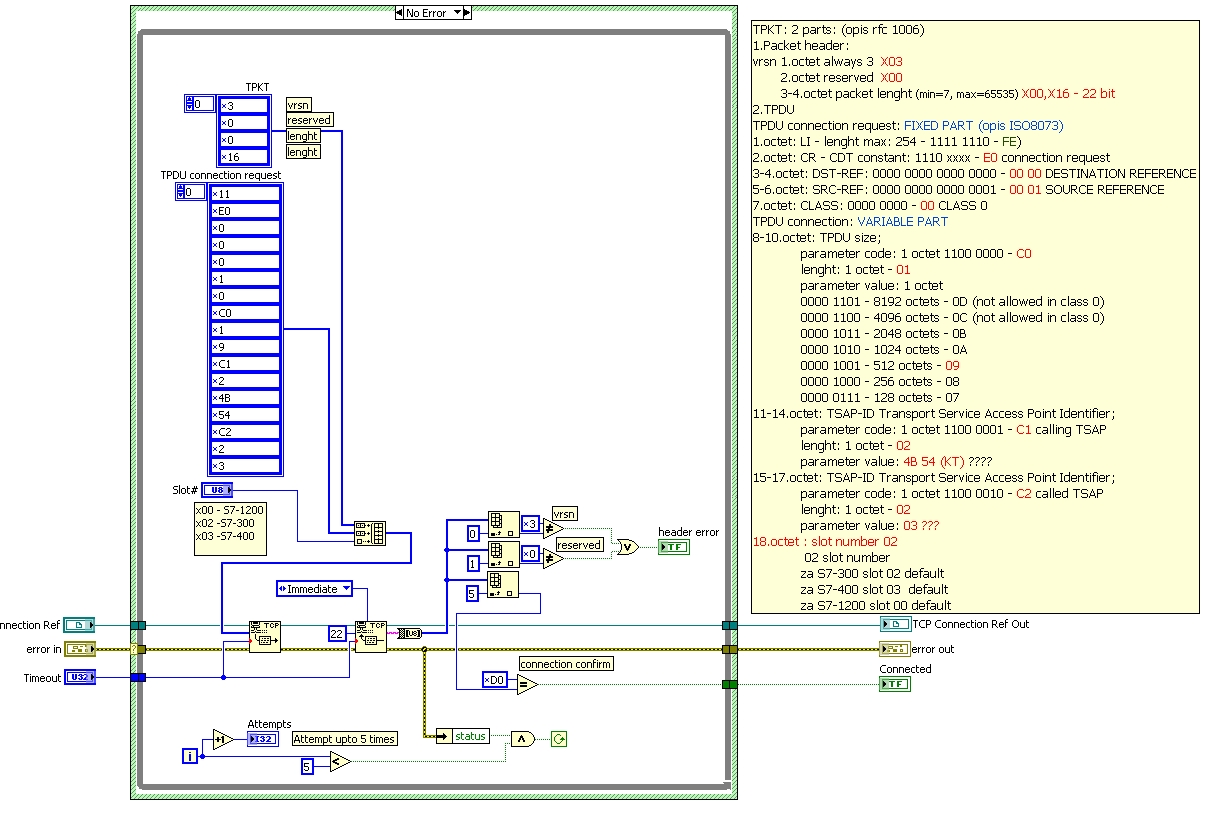
Bobi, can you help me, please?
I try to connect via TCP/IP a PC with Siemens S7-1200, with some VI built for S7-300 that work fine (with S7-300)
The port that I have setted is 102, I think the problem is in TPKT connection, can you explain to me better what you said with "For connect to S7-1200 18th element should be changed to X0. The default slot# for S7-1200 is 0."
I attach a photo of diagram VI if you find the error.
I hope you help me
Thank you.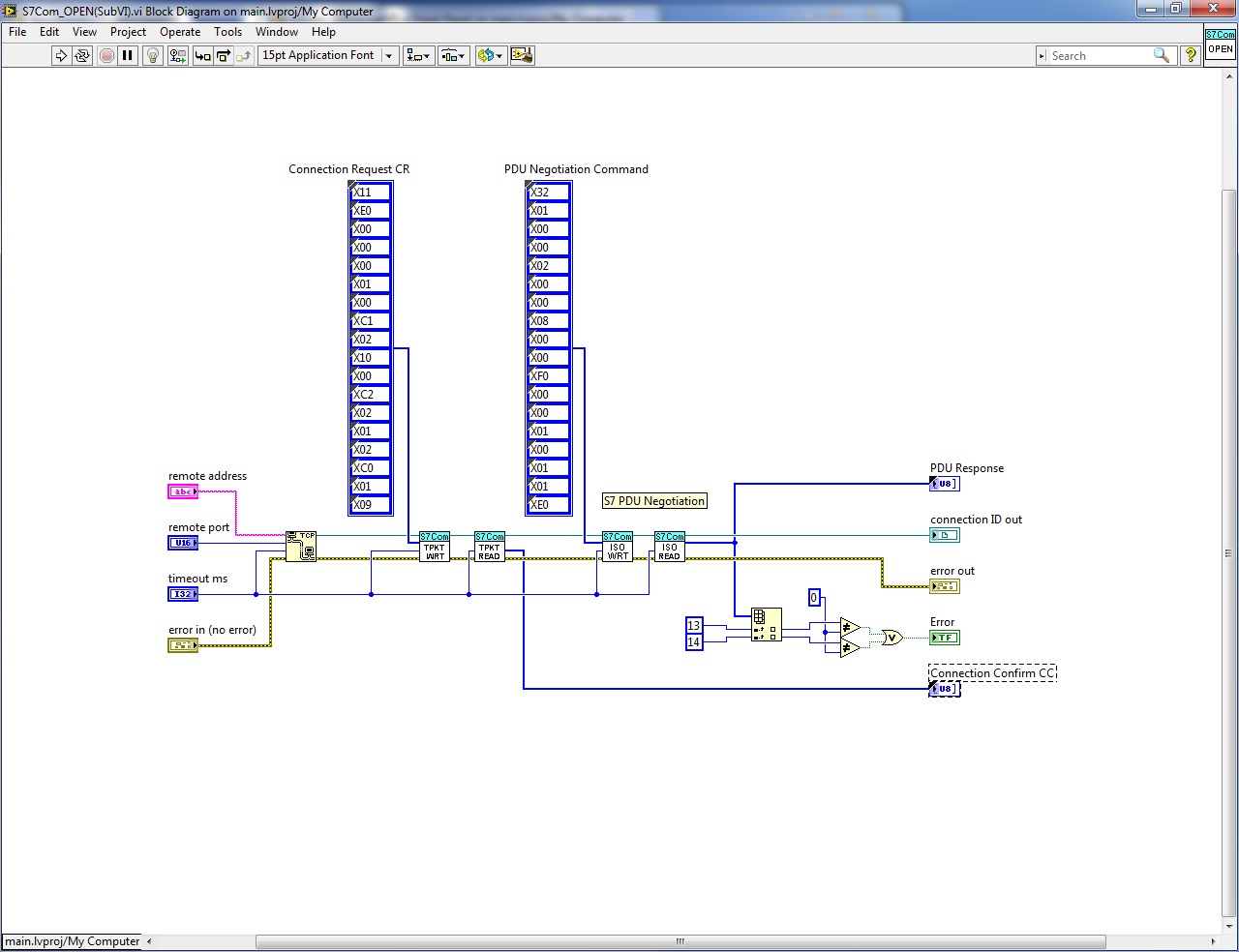
- Mark as Read
- Mark as New
- Bookmark
- Permalink
- Report to a Moderator
Thank you, I have changed my values of inizialization of TPTK with yours and it works!
You help me very much, great!

- Mark as Read
- Mark as New
- Bookmark
- Permalink
- Report to a Moderator
Hello guys,
For sure the VIs are working. I tested this in office. It's excellent.
But i have another puzzle: if i want access more different data block at the same time, how can i do? For example: to read data from DB10,DB11 and DB13, how to organize the sending message?
And, if there are two CPUs in one rack, how to organize sending message to access one CPU? need assign slot number?
- Mark as Read
- Mark as New
- Bookmark
- Permalink
- Report to a Moderator
If you want to access more data at the same time, it would be better to have all DBs sequenced in READ one after another; if it is a contineous ongoing process. If you want to read the DB on demand, you can do at any time. But make sure you are not reading two DBs at a time; may be parallely. This might result in unknown feedback. It might result error or success since it is not an OPC server.
I am not sure if anyone have worked on two CPUs in one rack. Better give a try, it might be a Case Study of users.
- Mark as Read
- Mark as New
- Bookmark
- Permalink
- Report to a Moderator
Thanks, kunalbhate.
As i know, some data recording software, as IBA, it can get a lot data from CPU, and check them on-line, it looks that the datas got at same time.
In my lib there are some PLC station, one of them has 2 CPUs in one rack. I tryed to rread data from this station, but failed.
I think need set slot number in sending message. But i don't know how.
- Mark as Read
- Mark as New
- Bookmark
- Permalink
- Report to a Moderator
hello bobi ,i feel difficult to understand S7_Build_Message.vi because i don't know what protocol is used in it.Can you explain to me ? By the way ,i don't know the function of “Exchange PDU”.i wanna know the answer where are framed painting by red line in the attached picture . Hope you can help me . Thank you very much!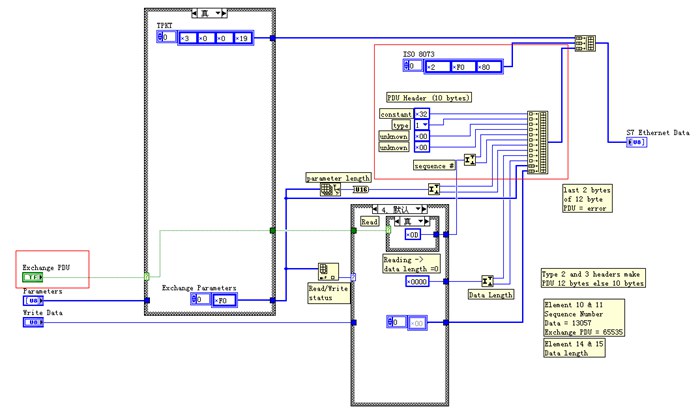
- Mark as Read
- Mark as New
- Bookmark
- Permalink
- Report to a Moderator
Parameters without labels are some fixed parameters used for comunnication. You can use Wireshark (http://www.wireshark.org/) to scope the packets on the TCP/IP connection.
- Mark as Read
- Mark as New
- Bookmark
- Permalink
- Report to a Moderator
thank you so much ,i will try it
- Mark as Read
- Mark as New
- Bookmark
- Permalink
- Report to a Moderator
Hello Everyone,
I am trying to communicate s7-1200 PLC communication with the LabVIEW using the TCP/IP communication.I need the configuration details for the PLC.How to configure the PLC to communicate with the LabVIEW.I need the help.
Thank you very much..

- Mark as Read
- Mark as New
- Bookmark
- Permalink
- Report to a Moderator
Hello,
Many thanks for sharing this code.Its working fine with S7-300 series PLC.
I would like to communicate with S7-400 series PLCs in same manner.
Please help me for the same.
Thanks,
Rasesh Dave
- Mark as Read
- Mark as New
- Bookmark
- Permalink
- Report to a Moderator
Hello Steven,
I am also looking for comunication with S7-400 PLC. I think you can help me by providing code for the same.
Waiting for your Positive Reply.
Thanks in advance,
-Dave Rasesh

- Mark as Read
- Mark as New
- Bookmark
- Permalink
- Report to a Moderator
Thanks for your Reply.
Its working fine for S7-400 PLC.

- Mark as Read
- Mark as New
- Bookmark
- Permalink
- Report to a Moderator
Hi MarcoPolo 5,
first of all thanks for the code that you shared.
The communication works perfectly. Unfortunately, I have a problem of interpretation of the data; I have a variable stored in the plc: 10.00; in labview I set "S7_Transport_Size = REAL" and the result is 1092616192. In the front panel of labview instead, I would read 10.00. If I change to "DWORD" I always read 1092616192. What is wrong!?!?


